Local application · multi-source evidence · human approval required
Toxic Backlink Checker
Run repeatable backlink audits on your computer. Combine optional DataForSEO retrieval with CSV exports from Search Console, Ahrefs, Semrush, Majestic, Moz, or another source. The application preserves source attribution, compares each audit with the previous run, records decision history, and keeps every draft disavow entry behind explicit human approval.
Processing
Application Scope
The checker accepts DataForSEO rows and imported backlink CSVs, normalizes their common fields, merges duplicate links, and retains every reporting source. It groups patterns by referring domain, anchor, target, link attributes, dates, and repeated placement. Deterministic rules identify evidence that needs review. Selected public pages are inspected with strict network and resource controls.
Saved audits become a history for the same target. The comparison separates new and missing domains, changed evidence and decisions, changed approvals, and additions or removals in the proposed disavow draft. Absence from one source is not treated as proof that Google stopped counting a link.
The report assigns one of five review states: keep, review, remove URL, disavow URL, or disavow domain. The application does not determine whether Google counts a link, attribute a ranking loss to a link, or submit data to Search Console.
Interface and Report Output
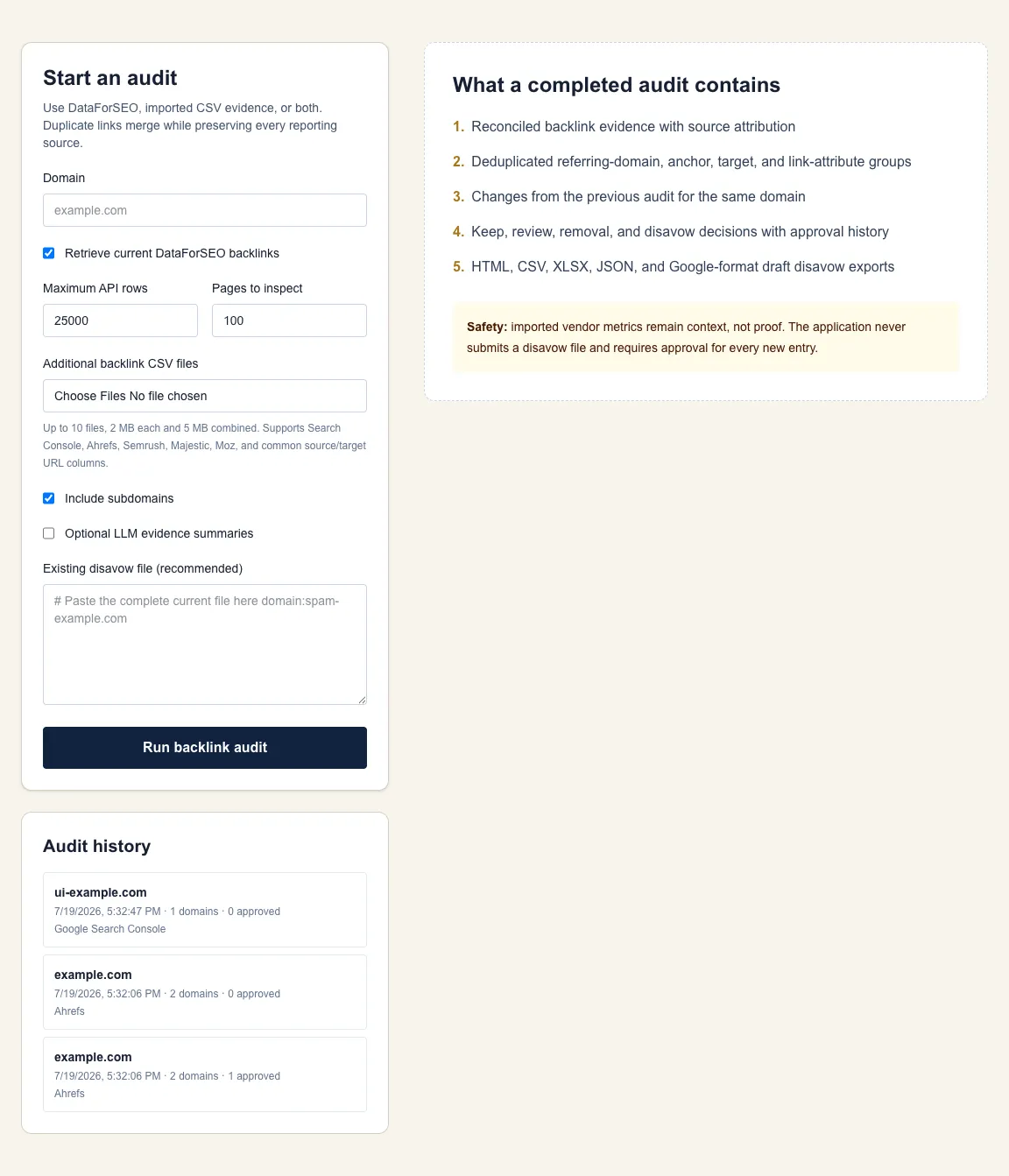
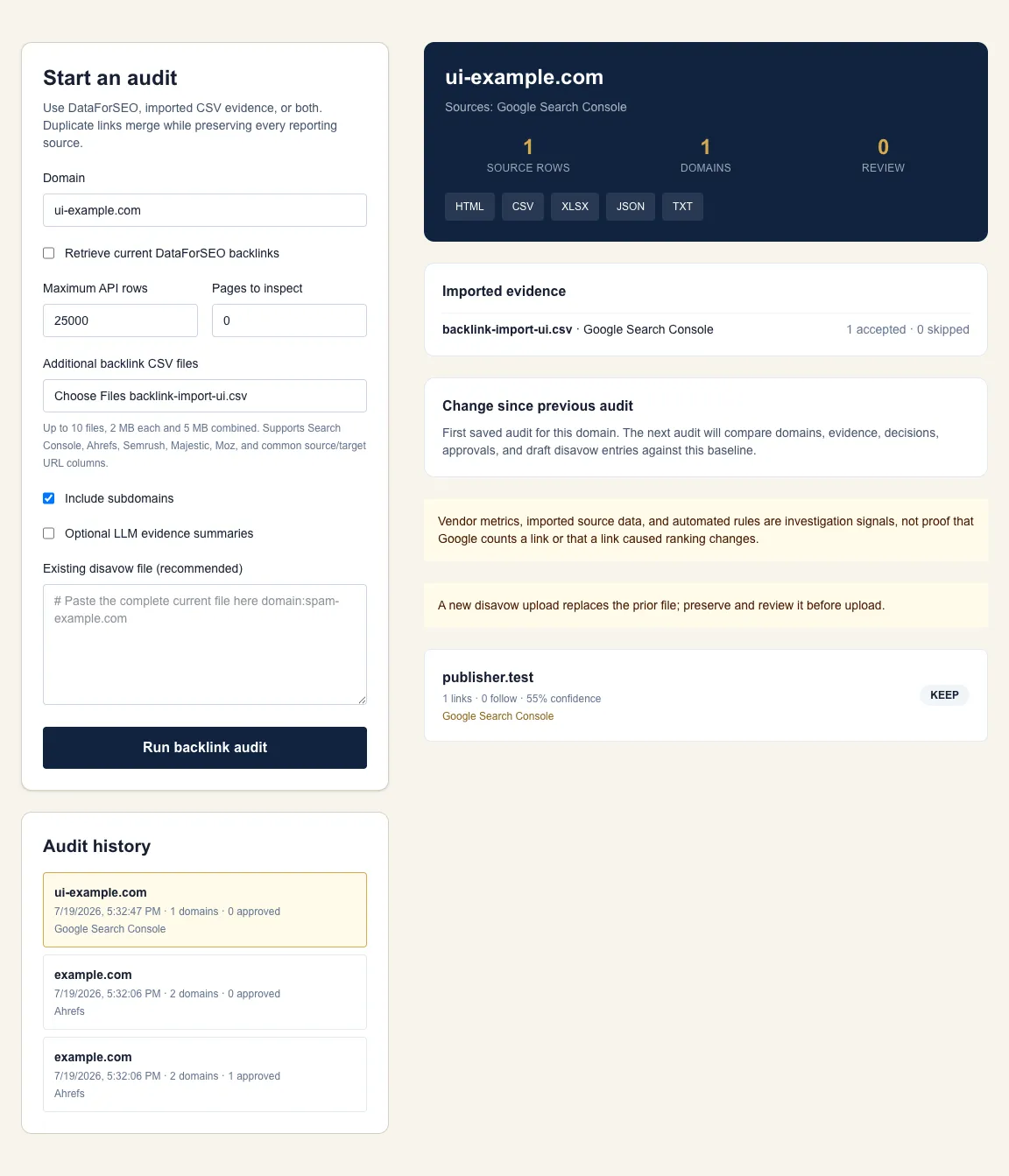
Sample deliverables
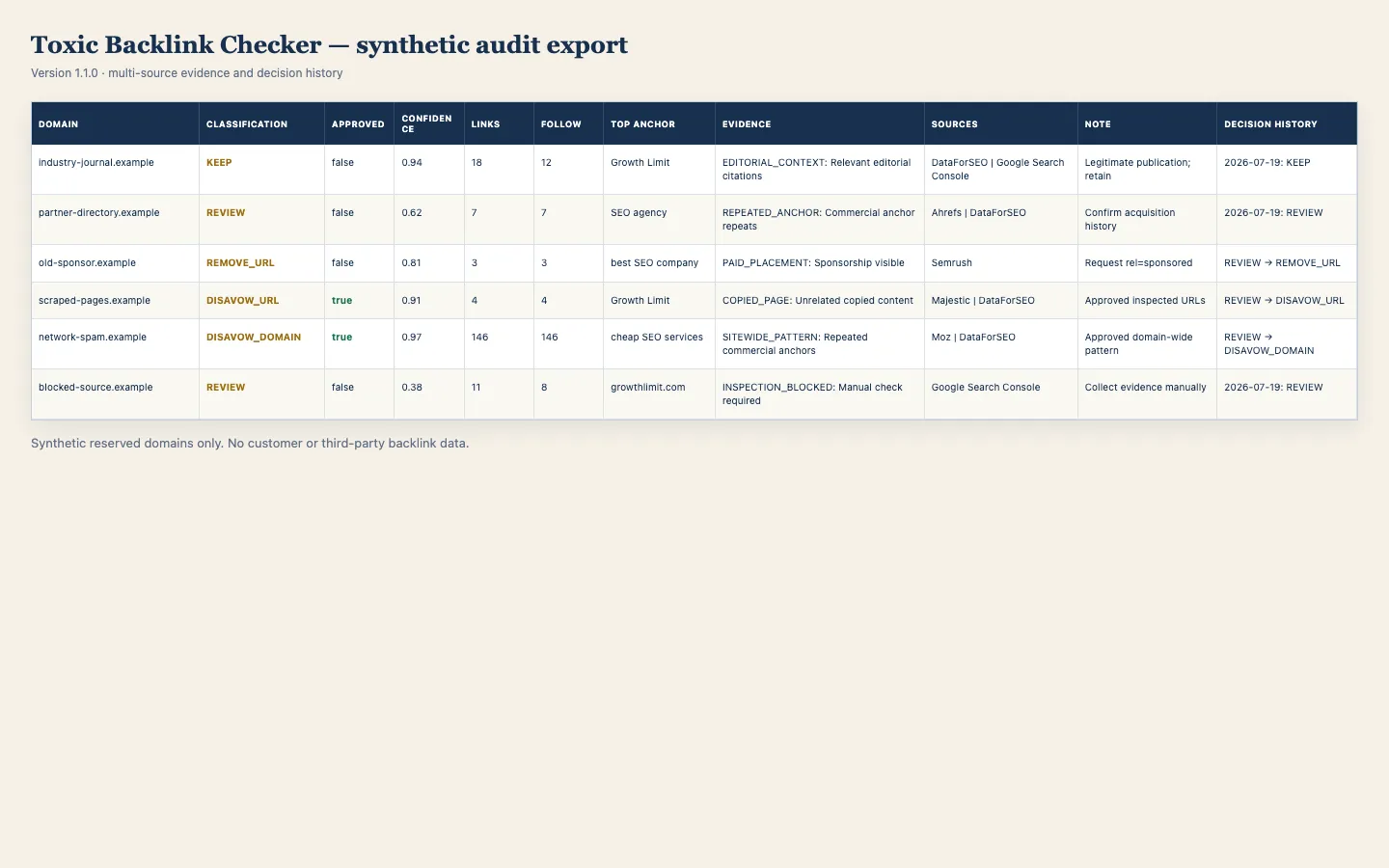
See the Files Before Running an Audit
These downloads use synthetic reserved example domains. They show source attribution, classifications, approval and decision history, evidence notes, and the draft format produced by the checker without exposing customer or third-party backlink data.
Installation
Docker Installation Procedure
Version 1.1.0 is published in the GrowthLimitOpenSource organization. Clone the repository, keep any credentials in the ignored local environment file, run the required checks, and bind the application only to localhost.
Install with an LLM or coding agent →- 1
Install Docker Desktop
Install Docker Desktop on macOS, Windows, or Linux, open it, and wait for the engine to report that it is running.
- 2
Clone the public source
Clone the official GrowthLimitOpenSource repository, then confirm that LICENSE, SECURITY.md, and .env.example are present before entering credentials.
git clone https://github.com/GrowthLimitOpenSource/toxic-backlink-checker-growthlimit.git cd toxic-backlink-checker-growthlimit cp .env.example .env.local - 3
Create DataForSEO API credentials if needed
DataForSEO is optional when importing a valid backlink CSV. For live API retrieval, open DataForSEO's API access area and copy the API login and API password. They may differ from your website sign-in password.
Create or access DataForSEO credentials → - 4
Create the local environment file
Copy .env.example to .env.local. If using DataForSEO, enter its two values locally. Never paste credentials into source files, screenshots, issues, commits, or chat.
- 5
Start the local application
Run docker compose up --build, then open http://localhost:3000. Audit files and decision history persist in the mounted local data directory.
docker compose up --build # Open http://localhost:3000 - 6
Run a bounded first audit
Use 1,000 DataForSEO rows, import one or more supported CSV exports, or combine both. Start with 20 representative pages. Confirm source attribution, import counts, provider cost, inspection results, and downloads before increasing limits.
- 7
Compare the audit history
After another audit of the same domain, review new and missing domains, evidence and decision changes, approval changes, and additions or removals in the draft disavow file.
- 8
Review evidence one domain at a time
Check acquisition history, publisher legitimacy, placement, anchor and target patterns, page context, and Search Console's actual Manual Actions report.
- 9
Approve only justified scope
Choose keep, review, remove URL, disavow URL, or disavow domain. Every disavow entry requires individual approval; domain entries have no bulk approval.
- 10
Archive and inspect every export
Download HTML, CSV, XLSX, JSON, and the draft text file. Preserve the existing disavow file, review the comparison with the prior audit, and inspect every proposed addition and removal before any manual upload.
Affiliate disclosure
Optional Dataforseo Account, Cost, and Affiliate Disclosure
When live API retrieval is enabled, the checker uses your DataForSEO account. Growth Limit may receive 25% of the first payment made by a customer who registers through the referral link and purchases an eligible DataForSEO product. Growth Limit uses this revenue to pay for API testing and maintenance of this and future tools.
This is an affiliate commission paid to Growth Limit. It is not a promised customer discount. DataForSEO controls eligibility, pricing, credits, and current program terms. Review the current checkout and terms before paying. CSV-only audits do not require a DataForSEO account.
Open DataForSEOObserved test cost
Provider-reported cost for the bounded 100-row Growth Limit smoke audit: one summary task plus one backlink task.
At the documented July 2026 price of $0.024 per request plus $0.000036 per returned row, a full 1,000-row request is about $0.06. Pricing can change. The checker records DataForSEO's returned task cost, and its default cap prevents accidental unlimited retrieval.
Decision Definitions
| Decision | Use when | Draft effect |
|---|---|---|
| Keep | No evidence justifies action, or legitimate context outweighs weak signals. | Excluded |
| Review | Evidence is incomplete, conflicting, inaccessible, or needs acquisition history. | Excluded |
| Remove URL | A real publisher can remove or properly qualify a specific placement. | Excluded; tracked for outreach |
| Disavow URL | Strong evidence applies only to specific linking pages. | Included after individual approval |
| Disavow domain | Repeated evidence supports domain-wide scope without risking legitimate material. | Included after individual approval |
Optional LLM
Optional LLM Processing
The deterministic pipeline runs before any LLM request. When enabled, an OpenAI-compatible model receives limited grouped evidence for review candidates. It may rewrite summaries and propose human checks. It cannot approve an entry, choose final scope, determine that Google counts a link, or create evidence that was not collected.
Manual configuration
- Create an API key with an OpenAI-compatible provider.
- Add the values below to
.env.local; do not enter them in the browser interface. - Restart the Docker container or Node.js process.
- Enable Optional LLM evidence summaries for an audit, or pass
--llmto the CLI. - Review the provider's retention and training terms before sending grouped page evidence.
LLM_PROVIDER=openai
LLM_BASE_URL=https://api.openai.com/v1
LLM_API_KEY=your_key
LLM_MODEL=gpt-5-mini
MAX_LLM_GROUPS=200Coding-agent installation
Install With an LLM or Coding Agent
A coding agent can inspect the repository, choose Docker or Node.js, run the checks, and start the local application. The operator must enter credentials locally. Secrets must not be pasted into an LLM conversation.
Install the Toxic Backlink Checker locally from this official repository:
https://github.com/GrowthLimitOpenSource/toxic-backlink-checker-growthlimit

1. Read README.md, SECURITY.md, .env.example, package.json, Dockerfile, and compose.yaml before running commands.
2. Check whether Docker Desktop and Node.js 22 LTS are installed. Prefer Docker when available. Ask before installing system software.
3. Clone the official repository and create .env.local from .env.example.
4. Confirm .env.local is ignored by Git.
5. Ask me to enter DATAFORSEO_LOGIN and DATAFORSEO_PASSWORD directly in .env.local. Never request or display credentials in chat, logs, screenshots, commits, or reports.
6. If I request LLM summaries, ask me to enter LLM_API_KEY, LLM_BASE_URL, LLM_MODEL, and LLM_PROVIDER locally. Otherwise leave LLM processing disabled.
7. Run npm ci, the focused tests, lint, and the production build.
8. Start the application only on localhost. Do not expose it to the public internet.
9. Confirm the local URL and test status.
10. Do not run a paid API audit until I approve the row and page limits. Start with at most 1,000 backlink rows and 20 page inspections.
11. Report DataForSEO-reported cost, retrieved rows, inspected pages, warnings, and output paths. Do not upload a disavow file.Security controls
- — Credentials remain server-side in .env.local and never enter reports.
- — Private, loopback, link-local, metadata, credential-bearing, and non-HTTP destinations are blocked.
- — DNS is checked before requests and after redirects.
- — Concurrency, timeout, byte, page, row, and LLM-group caps are configurable.
- — Raw inspected-page HTML is held in memory and not persisted.
- — The local app has no multi-user authentication and must not be exposed publicly.
Repository governance
Contributing to the Public Repository
The public repository accepts issues and pull requests. Growth Limit maintains the official roadmap, classification rules, security decisions, documentation, release tags, and branding. Apache License 2.0 permits forks; it does not require the official project to merge a proposed change.
1. Discuss
Open an issue before implementing a material behavior, schema, classification, cost, or security change.
2. Fork and branch
Fork the repository and create a focused branch from main.
3. Preserve evidence rules
Keep classifications deterministic, evidence-labeled, and independent of vendor scores alone.
4. Add focused tests
Cover observable behavior, boundaries, security controls, and real failure modes.
5. Run required checks
Run the test suite, linter, and production build before opening the pull request.
6. Submit for review
Describe behavior, security, API cost, storage, and report-schema effects in the pull request.
Contributors must have the right to submit their work under Apache License 2.0. Credentials, customer backlink exports, audit reports, and third-party page captures are prohibited. Security vulnerabilities must use the private reporting process in SECURITY.md, not public issues.
Operational Questions
Does the checker decide whether a backlink is toxic?
No. It groups evidence and prioritizes human review. A vendor score, low authority metric, unfamiliar TLD, or inaccessible page cannot establish a Google spam-policy violation.
Does Growth Limit receive my backlinks or API keys?
No. The application runs on your computer. Credentials stay in your local environment file, reports stay in local storage, and raw inspected-page HTML is not saved.
Do I need an LLM?
No. Retrieval, normalization, grouping, evidence rules, page inspection, review states, and exports work without an LLM. An optional OpenAI-compatible model can summarize grouped evidence and suggest human checks.
Will the checker upload a disavow file?
No. It creates a draft only after individual human approvals. You must preserve the prior file, review the complete replacement, and upload it manually if the evidence and Google's guidance justify that step.
What does DataForSEO cost?
DataForSEO charges your account. At its documented July 2026 rate, a full 1,000-row Backlinks API request is approximately $0.06, but pricing can change. Every report records the provider-reported task cost.
Can I use backlink exports from other tools?
Yes. The browser workflow imports Google Search Console, Ahrefs, Semrush, Majestic, Moz, and generic CSV files with source and target URL columns. DataForSEO is optional when at least one valid imported backlink row is available.
Methodology and Limitations
Google Search Console provides the authoritative status for manual actions. The linked methodology defines the evidence hierarchy used by this application. Proposed actions remain attributable to stored evidence and can be changed before export.