Ahrefs API V3: Request Builder, Unit Planner, and Code
Build valid Ahrefs API v3 requests, control API-unit exposure, and download tested Python, Node.js, and Google Sheets starters.
.jpeg)
Published June 27, 2026Updated July 19, 2026Reviewed July 19, 2026
Answer First: Use Ahrefs API V3 for Recurring Operational Decisions
Use Ahrefs API v3 when the same report repeatedly determines which lost links to recover, declining pages to refresh, competitors to investigate, or properties to inspect. Use the Ahrefs interface for isolated exports. Automation is justified when its recurring labor savings exceed the cost of credentials, API units, implementation, monitoring, and maintenance.
API v3 uses a bearer key in the Authorization header. Most data requests consume API units based on returned rows and selected fields, with a documented minimum of 50 units per unit-consuming request. The default rate limit is 60 requests per minute, and Ahrefs may also return 429 during dynamic throttling. Test with Ahrefs' documented free-query values before using a production target.
Free API planning workbench
Build an Ahrefs API v3 request without exposing a key
Choose a report, constrain fields and rows, generate cURL or application code, and calculate the minimum API-unit floor before production.
Use explicit select and limit values; verify important lost links with a live HTTP check.
# Selected fields — one line changes per checkbox
#   url_from
#   url_rating_source
#   domain_rating_source
#   traffic

curl --request GET \
  --url 'https://api.ahrefs.com/v3/site-explorer/all-backlinks?target=ahrefs.com%2Fblog&mode=subdomains&select=url_from%2Curl_rating_source%2Cdomain_rating_source%2Ctraffic&limit=100' \
  --header "Authorization: Bearer ${AHREFS_API_KEY}" \
  --header 'Accept: application/json'
Credential rule: this builder never asks for or stores an API key. Keep the placeholder and load the real key from a server-side environment variable, secret manager, or Apps Script Properties.
API V3 Eligibility, Authentication, Units, and Limits
| Control | Current rule | Implementation decision |
|---|---|---|
| Eligibility | API access is available on eligible paid plans; limited free test queries remain available on other paid plans. | Check the current plan before designing a production workflow. |
| Authentication | Send Authorization: Bearer YOUR_API_KEY. | Store the key in a server environment, secret manager, or Apps Script Properties. Exclude it from URLs and browser bundles. |
| Key ownership | Workspace owners and admins create and manage keys. | Give the workflow a named owner and record key expiration. |
| Key lifetime | Ahrefs documents a one-year key lifetime. | Alert before expiration so scheduled jobs retain valid authentication. |
| API units | Cost depends on returned rows and selected fields. A unit-consuming request has a 50-unit minimum. | Select only required fields, constrain rows, cache stable results, and inspect actual usage. |
| Rate limiting | Default limit: 60 requests per minute; dynamic throttling can also return 429. | Respect Retry-After when provided, use bounded retries, and avoid synchronized jobs. |
| Testing | Documented test targets and keywords can return free test queries. | Develop with ahrefs.com, yep.com, firehose.com, ahrefs, yep, or firehose only where the endpoint's free-test rules permit them. |
Sources: Ahrefs API introduction, API key management, free test queries, and the OpenAPI specification.
Choose the Smallest API Surface That Answers the Decision
API v3 currently covers Site Explorer, Keywords Explorer, SERP Overview, Rank Tracker, Site Audit, Batch Analysis, Brand Radar, Social Media Management, management endpoints, subscription information, and public crawler data. Availability and unit treatment vary by endpoint.
| Decision | API surface | Small initial pull | Evidence boundary |
|---|---|---|---|
| Recover a lost editorial link | Site Explorer | Referring URL, target URL, anchor, first-seen/lost dates, source metrics | Verify the page and link live before contacting anyone. |
| Prioritize a decaying page | Site Explorer or Keywords Explorer | Page or keyword trend, current position, estimated traffic | Confirm clicks, sessions, conversions, and revenue in first-party systems. |
| Compare up to 100 targets | Batch Analysis | Only the metrics used by the scoring rule | Label third-party metrics by source and derive business value from owned outcome data. |
| Inspect a current results page | SERP Overview | Country, keyword, selected fields, limited positions | A SERP snapshot is location- and time-specific. |
| Monitor owned projects | Rank Tracker or Site Audit | Existing project reports and issue counts | Preserve project, date, and configuration with every stored result. |
| Monitor AI visibility | Brand Radar | Brand statistics, prompts, and citations | Label the result as sampled platform evidence with incomplete market coverage. |
First Valid Request
Start with a documented free-test target, a narrow select, and a low limit:
curl --request GET \
  --url 'https://api.ahrefs.com/v3/site-explorer/all-backlinks?limit=3&mode=prefix&target=ahrefs.com%2Fblog&select=url_from%2Curl_rating_source%2Ctraffic%2Curl_to' \
  --header "Authorization: Bearer ${AHREFS_API_KEY}" \
  --header 'Accept: application/json'
Keep the key in the bearer header and execute the request from server-side code. On failure, record the HTTP status and response body while redacting the bearer key.
Use the Ahrefs Report API Button as a Query Builder
Ahrefs provides API buttons in reports. Apply the filters required by the decision, open the API button, and inspect the generated cURL. Retain the fields consumed by the downstream process. The interactive builder above follows the same principle and generates requests with a credential placeholder.
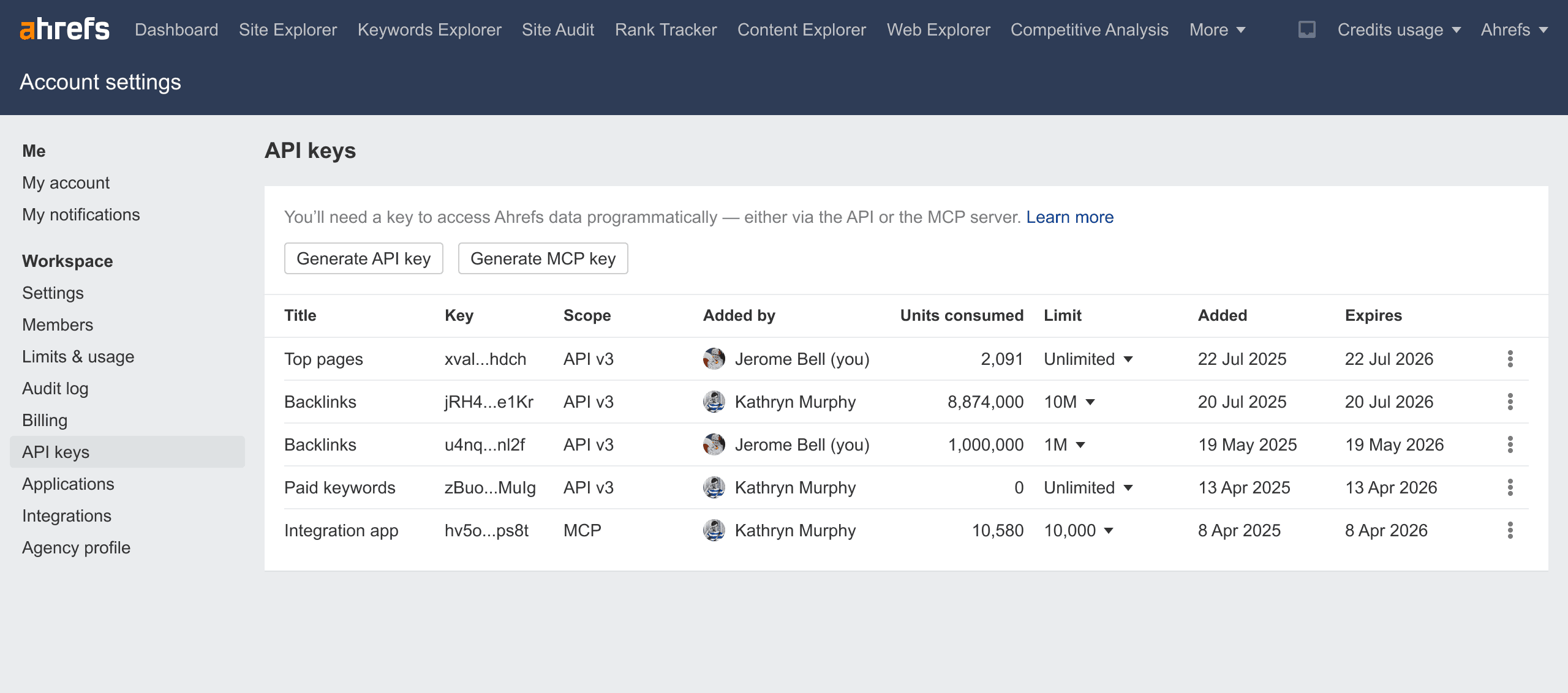
Create a bounded server-side key
Official Ahrefs interface · captured July 2026- 1Only workspace owners and admins can manage keys.
- 2Keys expire after one year and show their creator and status.
- 3Never paste a production key into a public webpage or workbook cell.
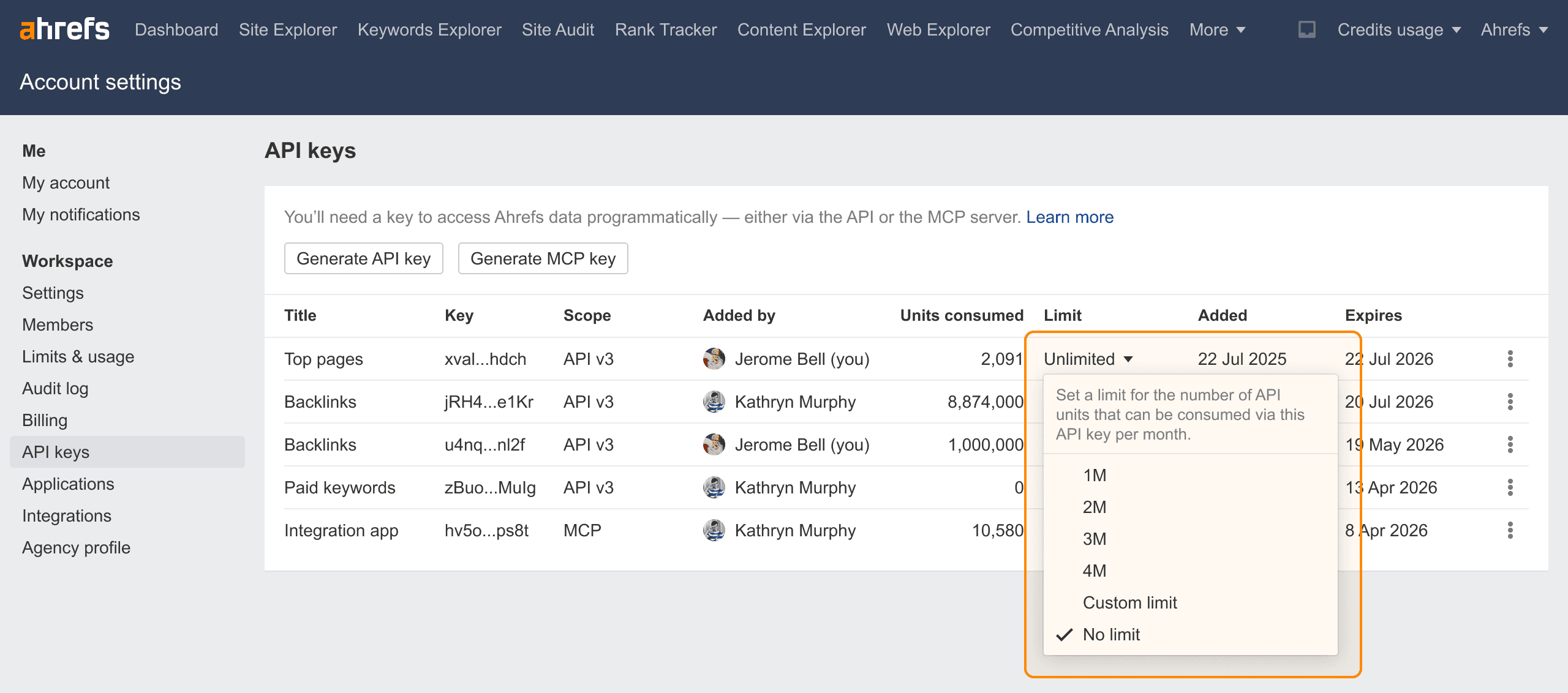
Limit unit exposure per key
Official Ahrefs interface · captured July 2026- 1Assign a limit before development begins.
- 2Use separate keys for production and testing.
- 3A bounded key reduces the cost of a loop, retry, or scheduling mistake.
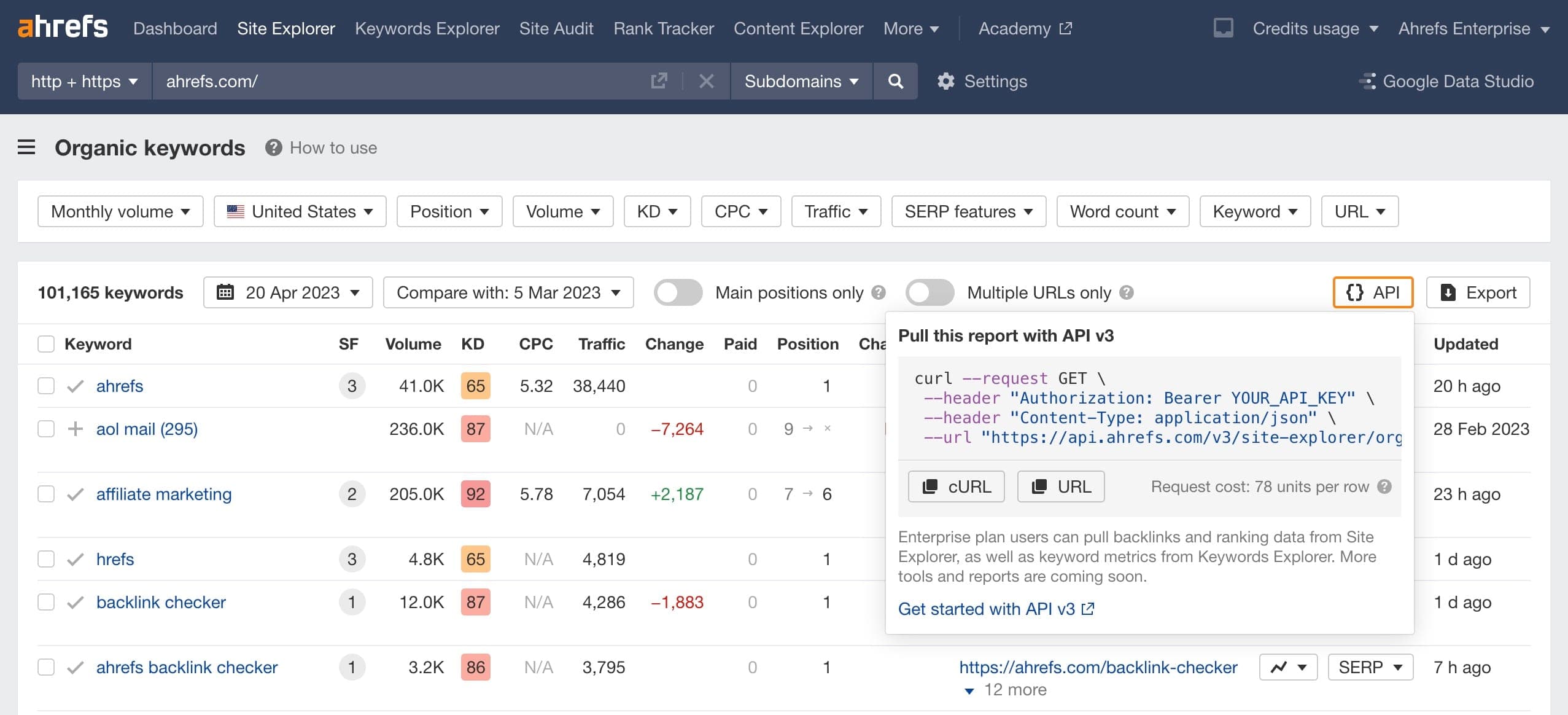
Use the report API button as a query builder
Official Ahrefs interface · captured July 2026- 1Apply the report filters needed for the decision.
- 2Open the API button to obtain the corresponding cURL request.
- 3Remove fields that are not needed because selected fields affect unit consumption.
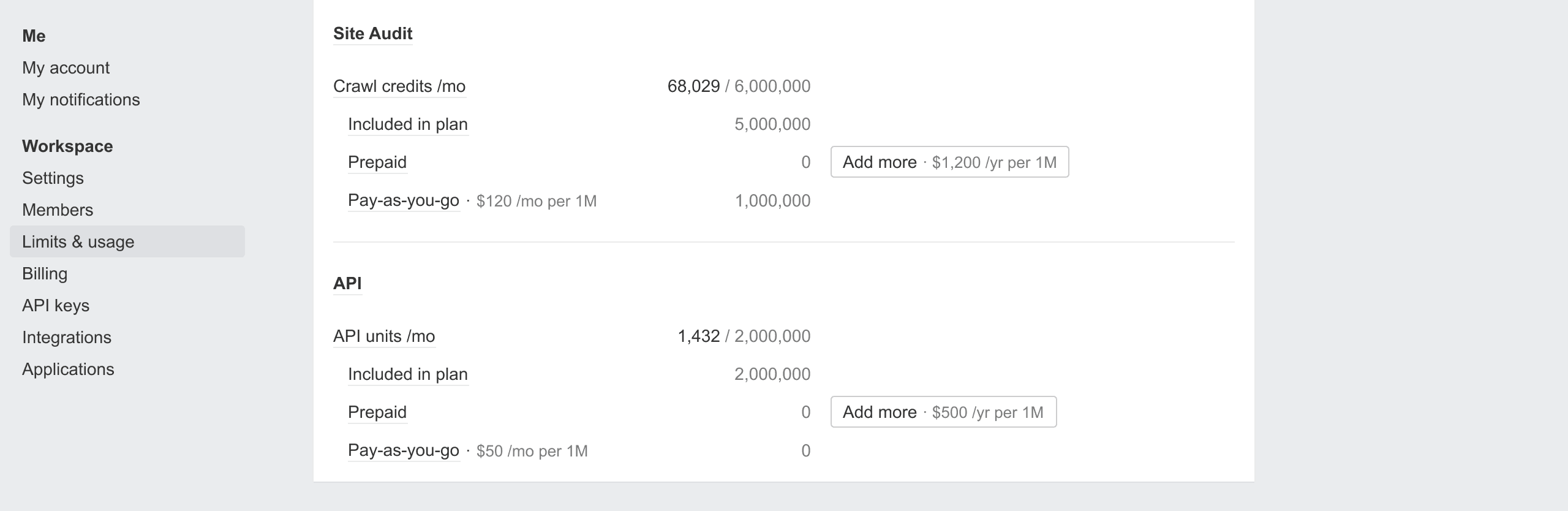
Verify actual consumption in Limits & Usage
Official Ahrefs interface · captured July 2026- 1The article's calculator provides a minimum floor, not an invoice forecast.
- 2Compare expected and actual units after the first production run.
- 3Disable or cap pay-as-you-go usage when uncontrolled overage is unacceptable.
Download Tested Starter Code
The starter files use the API v3 base URL, bearer authentication, bounded requests, narrow field selection, and documented free-test targets. Replace the target only after the request works and the key has a unit limit.
- Download the Python starter
- Download the Node.js starter
- Download the Google Sheets Apps Script starter
Python Setup
python -m venv .venv
source .venv/bin/activate
python -m pip install requests
export AHREFS_API_KEY='replace-in-your-shell-only'
python ahrefs-api-python-starter.py
The Python starter writes a bounded backlink response to ahrefs-backlinks.csv. It retries 429 responses at most four times, honors a numeric Retry-After value when present, and caps each wait at 30 seconds.
Node.js Setup
export AHREFS_API_KEY='replace-in-your-shell-only'
node ahrefs-api-node-starter.mjs
The Node.js starter requires a current Node release with native fetch and AbortSignal.timeout. It writes ahrefs-backlinks.json; the bearer key remains confined to the request header.
Google Sheets Setup
- Open Extensions → Apps Script.
- Add the downloaded
.gsfile. - Open Project Settings → Script Properties.
- Add
AHREFS_API_KEYto Script Properties. - Run
refreshAhrefsBacklinksand authorize the script.
The script uses a document lock to prevent duplicate requests from overlapping triggers. It records the retrieval time and source beside the imported data.
Plan API Units Before Scheduling the Job
For a unit-consuming endpoint, a conservative lower bound is:
minimum unit floor = requests per month × 50
The formula produces a consumption floor. Exact usage and billing depend on the endpoint, returned rows, selected fields, plan allowance, and current pricing. Empty result sets can consume units. Ahrefs documents consumed units as non-refundable.
Before scheduling:
- Start with a documented free-test target.
- Select only fields used by a downstream rule or report.
- Limit rows before adding pagination.
- Use Batch Analysis only where its contract fits the targets.
- Cache data when additional freshness would leave the resulting action unchanged.
- Set a per-key limit.
- Run once against the production target.
- Compare the estimate with Limits & Usage.
- Add a spend and failure alert before increasing frequency.
Pagination, Filtering, and Storage
Pagination contracts vary by endpoint. Read the current endpoint schema in the OpenAPI reference and preserve the request contract with stored results.
Every stored run should include:
- Retrieval timestamp in UTC
- Endpoint and API version
- Target and target mode
- Country and dates where applicable
- Selected fields
- Filter and ordering expressions
- Requested limit
- Returned row count
- Workflow owner
- Source label:
Ahrefs API v3 - Whether the metric is observed, modeled, or joined from first-party data
Keep raw retrieval separate from transformed tables. Stored raw data supports diagnosis of field changes, deduplication errors, and dashboard discrepancies while avoiding another paid request.
Bound Retries and API-Unit Exposure
| Status or condition | Meaning | Action |
|---|---|---|
400 | Invalid parameter, selection, or filter | Stop and correct the request. Retry after the input changes. |
401 or 403 | Missing, invalid, expired, or unauthorized key | Stop, verify key ownership and plan access, then rotate if required. |
429 | Rate limit or dynamic throttling | Honor Retry-After, use exponential backoff, cap attempts, and alert on exhaustion. |
5xx | Temporary service failure | Retry a small bounded number of times with jitter; preserve the failed run. |
| Empty rows | Valid request with zero matching rows, wrong scope, or changed data | Verify target mode, dates, filters, and the same request in Ahrefs before broadening it. |
| Large metric jump | Real change, query drift, source update, or parsing defect | Compare the stored request and raw response before publishing the value. |
A production scheduler requires a concurrency limit, an idempotency strategy, and a finite retry budget. Unbounded retries create uncontrolled API-unit consumption.
Three Recurring API Workflows
1. Lost-Link Recovery Queue
Pull lost backlink evidence from Site Explorer, then verify the referring page with a live HTTP request. Join only the business fields needed to assign work: relationship owner, target-page value, contact history, action, and due date. Classify each row as recover, redirect, update target, contact publisher, or ignore.
Ahrefs records link changes observed by its index. Quantify business effects separately through recovered referral traffic, organic conversions, or qualified pipeline.
2. Content-Decay Queue
Combine Ahrefs page and keyword trends with Search Console clicks and impressions, analytics sessions and key events, CRM opportunities, and the page's last meaningful update. Send conflicting evidence to manual review with each source preserved.
| Ahrefs trend | First-party trend | Business value | Action |
|---|---|---|---|
| Down | Down | High | Inspect query loss, SERP changes, page quality, and technical state now. |
| Down | Flat | Medium | Monitor; first-party measurements remain stable. |
| Flat | Down | High | Investigate analytics, demand, SERP CTR, and conversion changes. |
| Up | Up | Low | Keep stable unless the page supports another owned goal. |
3. Competitor Link-Intersection Pipeline
Use competitor referring-domain evidence to create a research queue. Preserve the source page, competitors linked, relevant metrics, topical fit, placement type, and discovery date. A person should confirm that each publisher is legitimate, relevant, reachable, and appropriate before outreach begins.
DR measures an Ahrefs-defined domain property. Editorial quality, purchase intent, and expected revenue require separate evidence.
Join Ahrefs Estimates to First-Party Data with Explicit Source Labels
Ahrefs traffic, keyword, and cost metrics are third-party estimates. Search Console measures activity in Google Search. Analytics records site behavior subject to consent and implementation. A CRM records sales process outcomes. Keep those roles explicit.
A defensible dashboard labels each field:
| Field | Source | Evidence type |
|---|---|---|
| Referring domains | Ahrefs API | Third-party index observation |
| Estimated organic traffic | Ahrefs API | Modeled estimate |
| Google clicks | Search Console | Aggregated platform measurement |
| Organic sessions | Analytics | First-party implementation-dependent measurement |
| Qualified opportunities | CRM | Owned business record |
| Revenue | Billing or CRM | Owned financial record |
An Ahrefs metric and pipeline can correlate under several attribution models. Define the selected attribution model and retain the raw source labels.
Release Checklist
- The request uses
https://api.ahrefs.com/v3. - The key is sent only through the bearer header.
- The key is server-side, bounded, owned, and monitored for expiration.
- Development uses a documented free-test query.
select, row limits, dates, and filters are explicit.- Retries are bounded and
429handling is tested. - The job stores request metadata and raw responses.
- Estimated Ahrefs metrics remain distinct from measured analytics and revenue.
- Limits & Usage is checked after the first production run.
- An owner receives authentication, unit, schema, and scheduler failures.
FAQ
Is Ahrefs API v2 still appropriate for a new integration?
Build new integrations against API v3 and its current OpenAPI specification. Remove query-string token patterns inherited from older examples.
Can a public Growth Limit tool call Ahrefs with my key?
The builder creates code locally and uses a token placeholder. Supply the real credential only within infrastructure you control.
Does every request cost at least 50 units?
Ahrefs identifies free test queries, Rank Tracker, Management, Public, and some other endpoints as free. The 50-unit minimum applies to unit-consuming requests. Check the selected endpoint's current documentation.
Can the unit planner predict the exact bill?
The planner calculates a documented minimum floor and workload volume. Exact consumption depends on the endpoint, response rows, selected fields, plan allowance, and current pricing rules.
When should the workflow stay manual?
Keep the workflow manual when exports are infrequent, their results leave every owned decision unchanged, volume is small, or implementation and maintenance costs exceed recurring labor savings.
Conclusion
A bounded Ahrefs integration starts with one decision, one narrow API v3 request, a restricted key, a documented free test, and a measured production run. Control selected fields, rows, retries, and schedules before scaling. Label Ahrefs data as third-party evidence, retain explicit source labels when joining first-party outcomes, and retire workflows after their outputs cease to change an action.
Use one call to test fit.
Growth Limit checks whether the page topic connects to a real organic-acquisition constraint before proposing work.