How to Get Your Website Indexed by Bing
A focused procedure for getting a site or missing page discovered, crawled, and evaluated by Bing.
.jpeg)
Published July 19, 2026Updated July 19, 2026Reviewed July 19, 2026
Answer First
To get a website or page indexed by Bing:
- Add the canonical production site to Bing Webmaster Tools.
- Verify ownership or import the matching property from Google Search Console.
- Submit the canonical XML sitemap.
- Inspect one missing, commercially important URL.
- Fix the first failed condition reported for that URL.
- Request indexing once after the correction is live.
A successful submission does not mean the page is indexed. A successful public technical check does not mean Bing will retain or rank the page. The procedure ends when Bing URL Inspection reports the canonical page as indexed or eligible and no unresolved access or indexing restriction remains.
Business metric: measure qualified leads, purchases, registrations, or revenue from Bing organic landing-page sessions after indexing. Indexing is the technical completion state, not the business outcome.
Before Starting
Use one URL that meets all of these conditions:
- Public production URL.
- Final
200response rather than a redirect. - Canonical version of the page.
- Internally linked from another indexable page.
- Connected to a measurable outcome such as qualified leads, purchases, registrations, or assisted conversions.
- Included in the intended sitemap.
- Useful as a standalone search result.
Do not begin with a tracking URL, filtered category, parameter variation, redirect source, staging URL, or duplicate archive. Testing a noncanonical URL produces a result that does not establish the state of the page intended for search.
Record these two values before changing anything:
Site property: https://www.example.com/
Priority URL: https://www.example.com/important-page/
Protocol and hostname must match the public canonical site. http://example.com, https://example.com, and https://www.example.com are different inputs when redirects or property selection are involved.
Step 1: Add and Verify the Production Site
Open Bing Webmaster Tools and add the production property. Use the least disruptive available method.
| Existing access | Verification method | Completion check |
|---|---|---|
| Correct property in Google Search Console | Import the property | Imported hostname and protocol match the canonical site |
CMS verification field or shared <head> access | Bing verification meta tag | Exact tag appears in the live HTML source |
| DNS control | Bing DNS record | Bing verifies the property after DNS propagation |
| Web-root access | Verification file, when currently offered | File remains publicly available at the required path |
Importing from Google Search Console is usually the shortest path, but the imported property still requires inspection. An old property, staging hostname, or noncanonical protocol does not verify the production site used by readers and search engines.
Completion condition: the canonical production property remains verified after a new Bing Webmaster Tools session.
Step 2: Find and Check the Canonical Sitemap
Common sitemap locations are:
https://example.com/sitemap.xml
https://example.com/sitemap_index.xml
https://example.com/wp-sitemap.xml
| Platform | Common sitemap location | Primary check |
|---|---|---|
| WordPress core | /wp-sitemap.xml | Confirm that an SEO plugin has not replaced it |
| WordPress with Yoast or Rank Math | Often /sitemap_index.xml | Keep one plugin responsible for sitemap and canonical output |
| Shopify | /sitemap.xml | Use the live canonical domain |
| Webflow | /sitemap.xml | Enable sitemap generation and republish after indexing-setting changes |
| Squarespace | /sitemap.xml | Check hidden and disabled page treatment |
| Wix | /sitemap.xml | Check the live-domain and page-indexing settings |
| Next.js or custom application | Implementation-specific | Generate the sitemap on every production deployment |
Open the sitemap URL directly. A usable sitemap returns 200, contains XML rather than an HTML error page, uses the canonical hostname, and lists canonical public URLs. It should not contain staging pages, account pages, internal search results, redirect sources, or known error URLs.
Search the source XML for the exact priority URL. A sitemap index may link to several child sitemaps; the URL only needs to appear in the appropriate child file.
Completion condition: the sitemap is publicly accessible and contains the exact canonical priority URL.
Step 3: Submit the Sitemap to Bing
In the verified production property:
- Open Sitemaps.
- Select Submit sitemap.
- Enter the full canonical sitemap URL.
- Submit it.
- Wait for Bing to process the file.
- Review its status, warnings, errors, discovered URL count, and last crawl date.
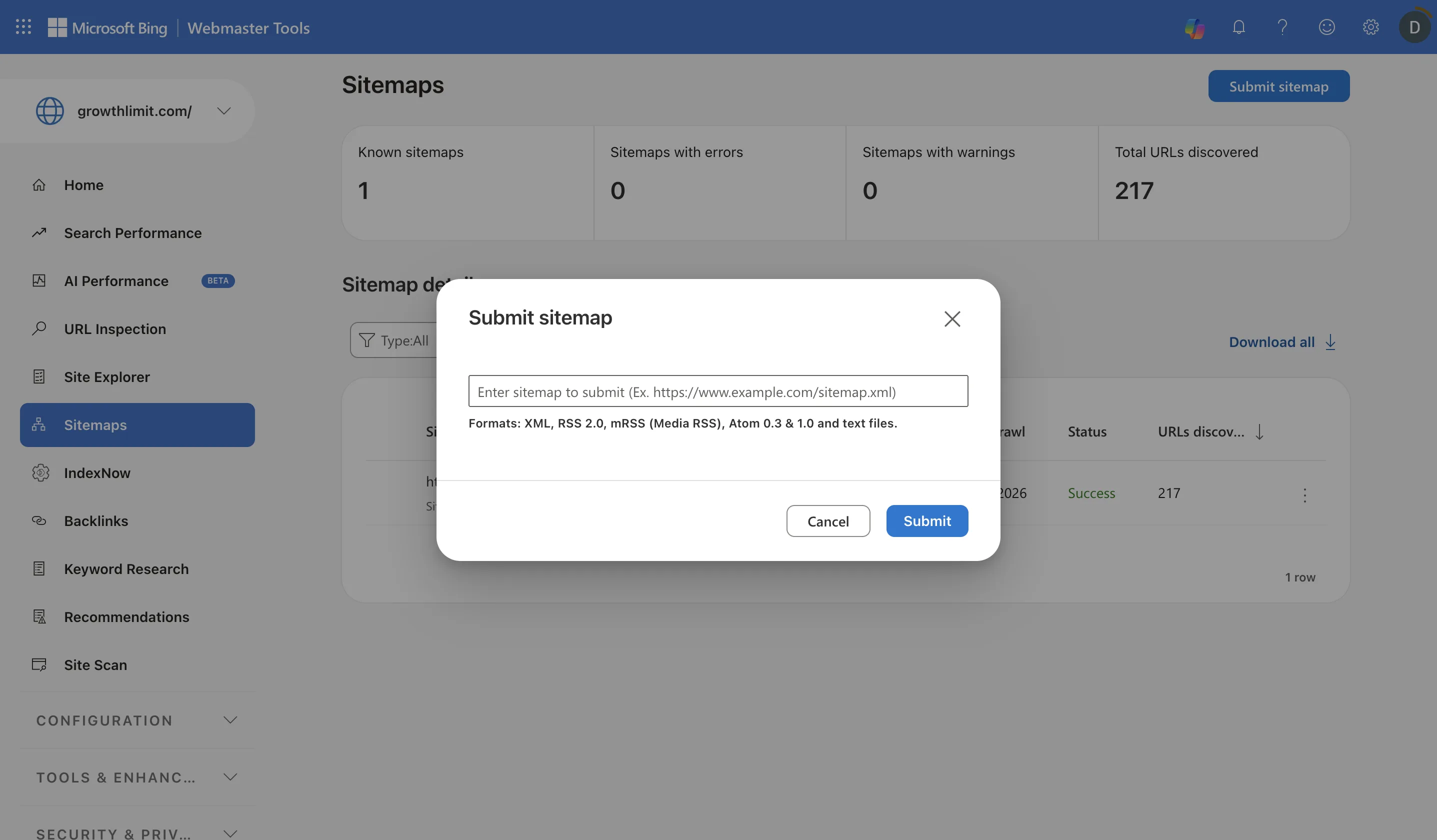
- 1Confirm that the selected property matches the canonical production site.
- 2Open Sitemaps in the property navigation.
- 3Enter the full canonical sitemap URL, including the protocol and hostname.
- 4Submit once, then review processing status instead of resubmitting unchanged XML.
Growth Limit property data. Interface captured July 19, 2026. Microsoft may change labels or report layouts.
A successful sitemap status establishes that Bing processed the file. It does not establish that every listed URL was indexed. An accepted sitemap can contain redirects, duplicate URLs, canonical conflicts, blocked URLs, weak pages, or URLs Bing elects not to retain.
Correct sitemap errors before repeatedly submitting the same file. Another submission of unchanged XML provides no new page state.
The broader Bing Webmaster Tools guide covers ongoing sitemap monitoring and reporting. This procedure uses the sitemap only to establish discovery for the missing page.
Completion condition: Bing reports the canonical sitemap as processed and the source XML contains the priority URL.
Step 4: Inspect the Missing Page
Run the priority URL through the public checker first.
Free public diagnostic
Check whether a URL is technically accessible to Bing
Test the response, redirects, canonical, robots directives, Bingbot access, sitemap discovery, and page title. No account or site access required.
The checker tests the public response, redirect path, canonical declaration, robots directives, sitemap inclusion, and page title. It cannot read Bing's private index.
Then inspect the same canonical URL in Bing Webmaster Tools:
- Open URL Inspection.
- Paste the exact priority URL.
- Select Inspect.
- Read the Bing Index result.
- Review crawl, canonical, robots, markup, and SEO findings.
- Use Live URL when the stored result may predate a recent deployment.
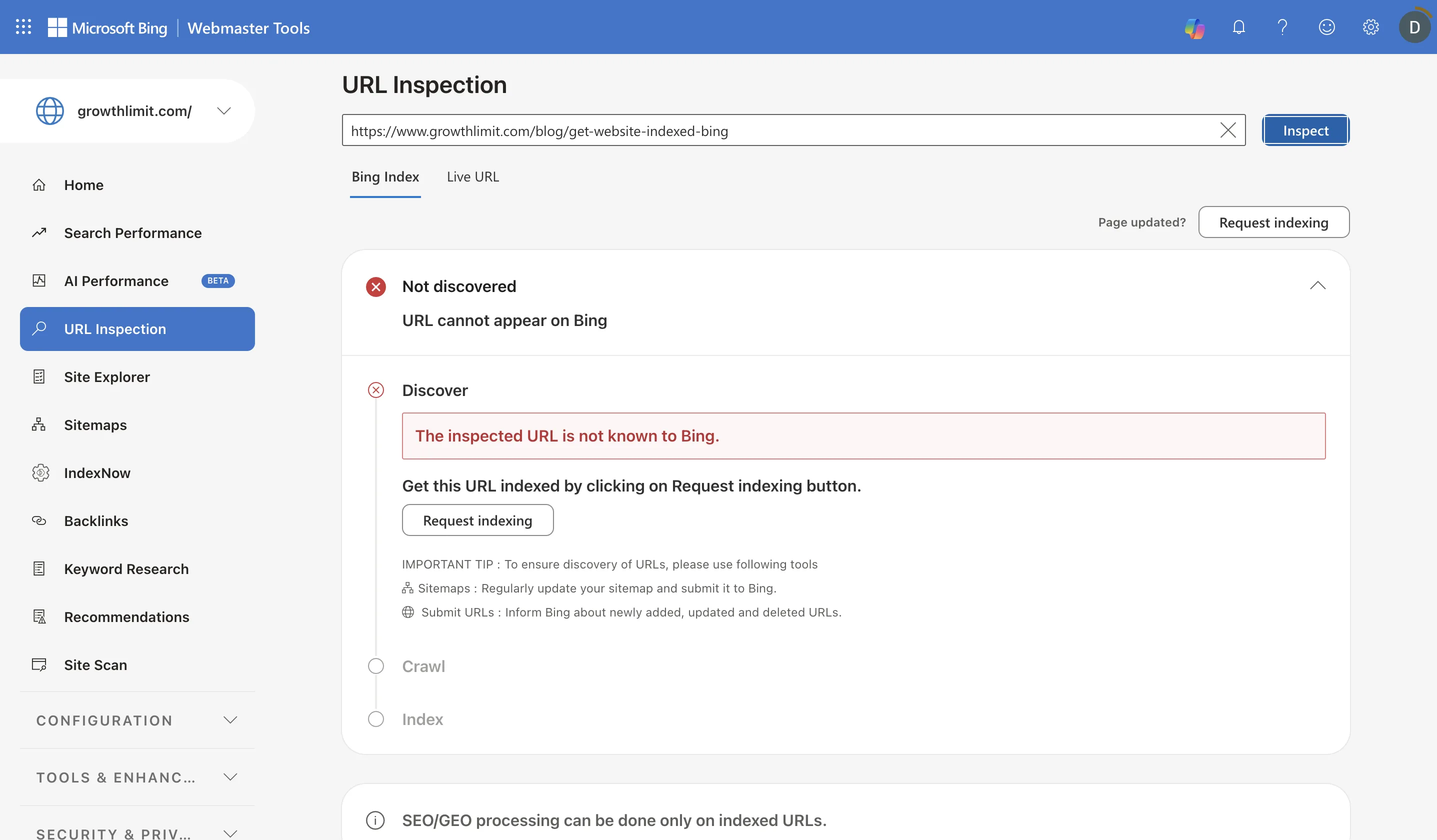
- 1Inspect the exact canonical URL rather than a redirect, tracking URL, or parameter variant.
- 2Use Bing Index to read Bing's stored discovery and indexing state.
- 3Not discovered means the first failure is discovery, not ranking or citation.
- 4Request indexing only after sitemap, internal-link, canonical, and access checks pass.
Growth Limit property data. Interface captured July 19, 2026. Microsoft may change labels or report layouts.
Compare the public result with Bing's stored result. A disagreement can occur when Bing crawled an older deployment, a CDN or firewall serves Bingbot differently, or the wrong property or URL variant was inspected.
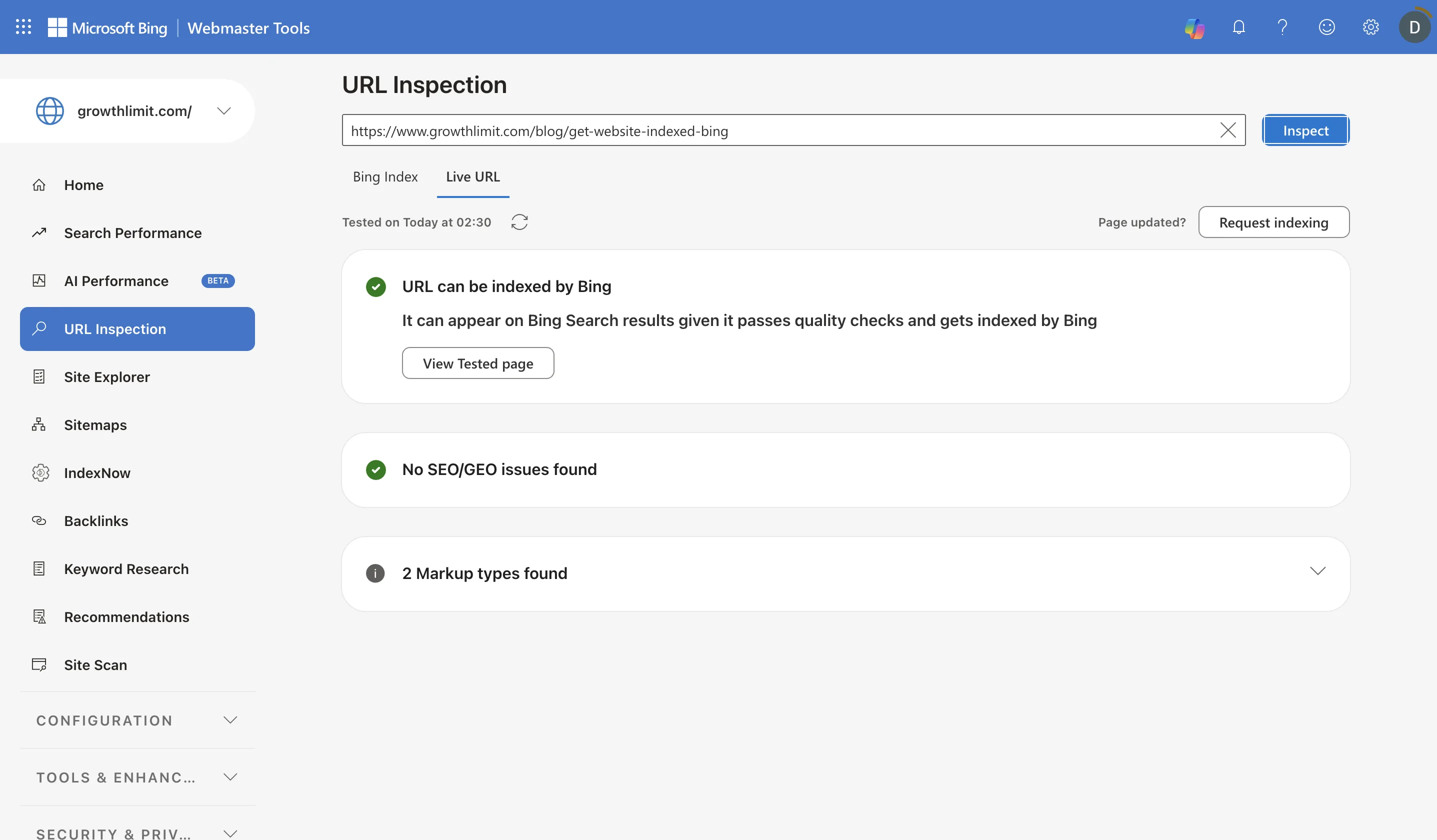
- 1Keep the inspected canonical URL identical when comparing stored and live results.
- 2Live URL tests the page Bing can retrieve now rather than its stored index record.
- 3Can be indexed establishes current technical eligibility; it does not establish indexing or ranking.
- 4Request indexing after the live page passes and the underlying discovery problem is corrected.
Growth Limit property data. Interface captured July 19, 2026. Microsoft may change labels or report layouts.
Completion condition: one dated record contains the public-check result and the Bing URL Inspection result for the same canonical URL.
Step 5: Fix the First Failed Condition
Use the earliest failed state. Do not change submission methods when the page is blocked, canonicalized elsewhere, or unsuitable for indexing.
| Bing or public-check result | What it establishes | Corrective action |
|---|---|---|
| URL is unknown to Bing | Discovery has not been established | Confirm sitemap inclusion, internal links, canonical hostname, and processed sitemap status |
| Redirect before the final page | The submitted URL is not canonical | Inspect and submit the final destination instead |
noindex detected | The page requests exclusion | Remove the directive only if the page is intended for public search, then deploy |
Blocked by robots.txt | The tested crawler path is disallowed | Remove the relevant rule only if crawl access is intended |
| Bingbot absent from server logs | Retrieval is not observed | Check robots rules, firewall policy, CDN bot controls, DNS, and server availability |
| Canonical points elsewhere | The page declares another preferred URL | Align canonical tags, internal links, sitemap entries, and redirects |
| Crawled but not indexed | Bing retrieved the page but did not retain it | Check duplication, soft errors, rendering, page purpose, and distinct information |
| Indexed successfully | Indexing is no longer the problem | Stop changing technical indexing controls; investigate ranking separately if required |
URL Unknown to Bing
Confirm that the exact canonical URL appears in the processed sitemap and in at least one crawlable internal link. Correct hostname, protocol, redirect, and sitemap-generation errors. Recheck after Bing processes the corrected sitemap.
Crawled but Not Indexed
Confirm a stable 200 response, self-referencing canonical, no noindex, usable rendered content, and a distinct page purpose. Compare the page with duplicates, tag archives, location variants, or older URLs competing for the same subject. Submission frequency does not repair duplication or insufficient page value.
Blocked or Served Differently to Bingbot
Compare the live browser response with robots rules, CDN settings, firewall logs, and server logs. User-agent access and IP validation must use current Microsoft documentation. Do not whitelist an unverified user-agent string by itself.
Indexed but Not Ranking
Indexing is complete. Ranking depends on query relevance, competition, page quality, internal links, external signals, location, and freshness. The Bing Webmaster Tools article covers Search Performance and ongoing measurement; those reports are outside this indexing procedure.
Step 6: Request Indexing Once
Request indexing after the relevant correction is live when the page is:
- Newly published.
- Corrected after a crawl or indexing restriction.
- Moved to a new canonical URL.
- Substantially updated.
Do not request indexing repeatedly for an unchanged page. The request does not alter the response code, robots policy, canonical target, sitemap, duplication, or page content.
After requesting indexing, record the request date and the condition expected to change. Reinspect the same canonical URL rather than submitting multiple URL variants.
When Indexnow Helps
IndexNow reports created, updated, or deleted canonical URLs to participating search engines. It is useful for sites that publish or change URLs frequently and can support it through the CMS, host, plugin, or application.
IndexNow supplements the sitemap and internal links. It does not replace them, and it does not force indexing. Use one active implementation; overlapping plugins or custom jobs can create duplicate notifications without improving the page state.
For a single missing page, complete URL Inspection and correct the failed condition before adding new IndexNow infrastructure.
Know When the Indexing Work Is Finished
Stop changing indexing controls when all applicable conditions pass:
- The canonical production property is verified.
- The canonical sitemap is processed.
- The priority URL appears in the source sitemap.
- The priority URL returns a final
200response. - No relevant
noindexor robots block remains. - The canonical points to the intended URL.
- Bing URL Inspection reports the page as indexed or eligible.
- A material correction has received one documented indexing request, when required.
An indexed page can still fail to rank. A ranking page can still receive no clicks. An AI product can still decline to cite it. These are separate problems and require separate evidence.
For ChatGPT source visibility after technical access is established, use How to Appear in ChatGPT Results. Bing indexing does not guarantee an OpenAI citation.
FAQ
How Long Does Bing Take to Index a New Website?
Bing does not publish one fixed timeframe for every site and page. URL Inspection identifies whether the current failure concerns discovery, retrieval, indexing, or a stored result that predates the latest deployment.
Why Is the Sitemap Accepted While the Page Is Not Indexed?
Sitemap acceptance means Bing processed the file. It does not require Bing to retain every listed URL. Inspect the page for access restrictions, canonical conflicts, duplication, soft errors, rendering problems, or insufficient distinct value.
Can a Page Be Submitted Without a Sitemap?
URL submission and IndexNow can report a page, but the sitemap and internal links provide durable discovery. A canonical sitemap remains the standard site-level source of public URLs.
Should Indexing Be Requested Every Day?
No. Request indexing after publication or a material correction. Repeated requests for an unchanged URL do not correct the underlying condition.
Does Bing Indexing Make a Page Appear in Chatgpt?
No. Bing indexing establishes a Bing index state. OpenAI controls crawler access, retrieval, source selection, and citation independently.
Use one call to test fit.
Growth Limit checks whether the page topic connects to a real organic-acquisition constraint before proposing work.