Localbusiness Schema: Generator, Examples, and Validation
Create accurate LocalBusiness JSON-LD, audit an existing page, and keep location facts consistent with Google Business Profile.
.jpeg)
Published June 27, 2026Updated July 19, 2026Reviewed July 19, 2026
Answer First: Localbusiness Schema Is a Fact-Control Layer
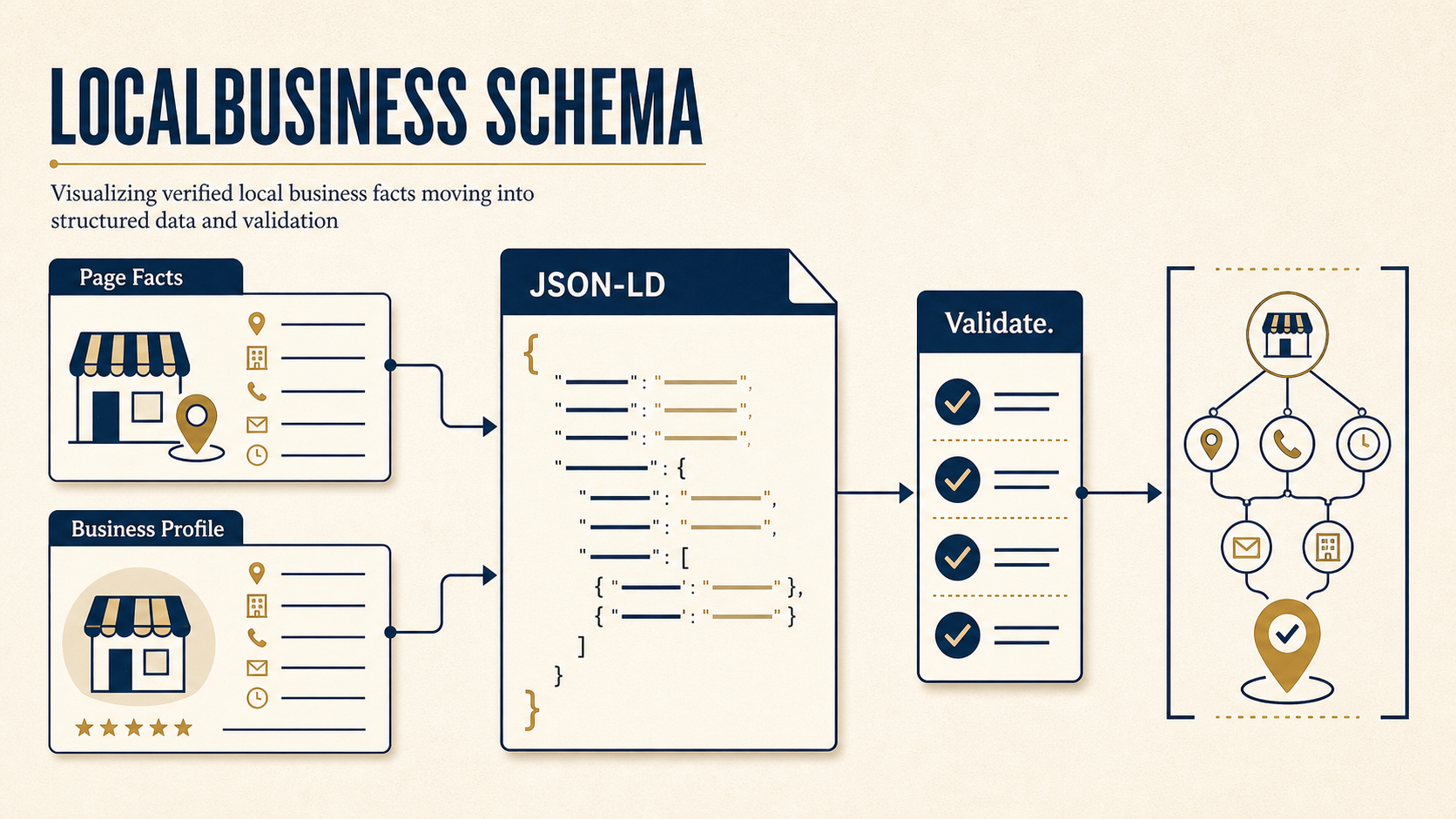
LocalBusiness schema is JSON-LD that identifies a real business or location and expresses public facts such as its name, URL, phone number, address, service area, coordinates, and hours. Use it to reduce ambiguity between the visible location page, the business entity, and related services. Do not use it to create a location, category, rating, or service claim that customers cannot verify.
Structured data is not a direct map-pack ranking lever. It cannot replace a maintained Google Business Profile, accurate citations, relevant location content, reviews, proximity, or prominence. Valid markup can help search systems understand a business and can support eligible search features, but display is not assured. Monitor search presentation and local conversions after implementation without attributing every change to schema alone.
Operating rule: publish a fact only when it is true, visible where required, and consistent with the location page and Google Business Profile. Treat syntax, Google feature eligibility, and factual accuracy as three separate checks.
Free implementation workbench
Generate and audit LocalBusiness JSON-LD
Create storefront, service-area, hybrid, or multi-location markup. Audit pasted JSON-LD or inspect a public page without creating an account.
Address and coordinates
Hours and profiles
{
  "@context": "https://schema.org",
  "@type": "ProfessionalService",
  "@id": "https://www.example.com/locations/downtown/#localbusiness",
  "name": "Example Advisory",
  "url": "https://www.example.com/locations/downtown/",
  "telephone": "+1-212-555-0142",
  "image": "https://www.example.com/images/downtown-office.jpg",
  "logo": "https://www.example.com/images/logo.png",
  "address": {
    "@type": "PostalAddress",
    "streetAddress": "100 Example Avenue",
    "addressLocality": "New York",
    "addressRegion": "NY",
    "postalCode": "10001",
    "addressCountry": "US"
  },
  "geo": {
    "@type": "GeoCoordinates",
    "latitude": 40.7505,
    "longitude": -73.9934
  },
  "sameAs": [
    "https://www.linkedin.com/company/example-advisory/"
  ],
  "openingHoursSpecification": [
    {
      "@type": "OpeningHoursSpecification",
      "dayOfWeek": [
        "Monday",
        "Tuesday",
        "Wednesday",
        "Thursday",
        "Friday"
      ],
      "opens": "09:00",
      "closes": "17:00"
    }
  ]
}
Pre-publish checks
Schema.org context
The document uses the canonical Schema.org context.
Local business entity
1 LocalBusiness entity was found.
Stable entity IDs
Every local entity has a distinct @id.
business name
Name found: Example Advisory
canonical URL
Absolute URL found: https://www.example.com/locations/downtown/
@id format
Absolute entity ID found: https://www.example.com/locations/downtown/#localbusiness
telephone
Phone found: +1-212-555-0142
location model
A postal address is present. Confirm customers can visit it if the page represents a storefront.
hours
Opening hours are present; compare them with the page and Google Business Profile.
Public fact consistency
Compare name, address or service area, phone, hours, URL, and business category with the rendered page and Google Business Profile. Syntax validation cannot establish truth.
Generated syntax is not proof that the business facts are accurate or eligible for a Google search feature. Compare the output with the visible page and Google Business Profile before publishing.
The workbench runs generated and pasted-schema checks in the browser. URL audits retrieve only public HTML, do not log in, and do not render client-side JavaScript. A pass confirms an observable implementation condition, not that Google endorses the business or will show a search feature.
Choose a Storefront, Service-Area, or Multi-Location Model
Decide what the page represents before selecting properties. A customer-facing storefront can publish its postal address, geo coordinates, and opening hours. A service-area business should describe the areas it actually serves without implying that customers can visit a hidden or unstaffed address. A multi-location brand needs a separate page and entity ID for every branch.
The address decision determines whether the markup should describe a storefront, a service area, or another kind of entity.
Does this page describe a real local business or location?
Use the page’s primary subject, not the richest-looking search feature.
Can customers visit the published address?
A staffed office, store, clinic, restaurant, or other customer-facing location.
Yes
Storefront or hybrid
Use address, geo, hours, telephone, URL, and the narrowest true LocalBusiness subtype.
No
Does it serve defined areas?
Use areaServed for a legitimate service-area business; do not imply a walk-in location.
Multiple customer-facing locations?
Create one canonical page and one stable LocalBusiness @id per branch.
No location or service area?
Use Organization, WebSite, Product, Service, Event, or another page-appropriate type instead.
Decision rule: markup should describe what customers can verify on the page. It should not manufacture a location, service area, or public access claim.
Use the narrowest true Schema.org LocalBusiness subtype. A restaurant can use Restaurant; a dental office can use Dentist; a retail location can use Store; a contractor may fit HomeAndConstructionBusiness. Use LocalBusiness when no narrower subtype describes the business accurately. Do not choose a type because it appears to offer a richer result.
| Situation | Recommended treatment | Do not claim |
|---|---|---|
| One customer-facing location | One specific LocalBusiness subtype on the homepage or canonical location page | Additional offices that do not exist |
| Service-area business | Specific subtype plus truthful areaServed values | Public access to a hidden or unstaffed address |
| Hybrid business | Address and geo for the real storefront plus a defensible service area | Nationwide service without operational proof |
| Multi-location brand | Parent Organization and one LocalBusiness entity per canonical location page | One shared location @id, phone, or address for all branches |
| Ecommerce or remote company without local service | Organization, WebSite, Product, Service, or other page-appropriate types | A LocalBusiness entity solely to target city queries |
Complete Json-Ld Examples
Open Examples in the workbench to copy or download three complete synthetic implementations:
- A single customer-facing storefront with address, coordinates, hours, image, profile, and stable
@id. - A service-area contractor with named service areas and no false storefront claim.
- A multi-location graph connecting the parent Organization, one branch, its WebPage, and a Service provider relationship.
Replace every example value. Reserved example.com domains and synthetic phone numbers are included so the examples cannot be mistaken for customer data. Run the edited markup through the workbench, Schema Markup Validator, and the relevant Google test before publishing.
Required, Recommended, and Conditional Fields
Schema.org permits many properties, but a maintainable entity uses only facts the business can own and update.
| Property | Treatment | QA rule |
|---|---|---|
@context | Required at the document or graph level | Use https://schema.org |
@type | Required | Choose the narrowest true type |
@id | Operationally required | Use one stable absolute URL per entity |
name | Required | Match the public business name; do not add keywords |
url | Required | Use the canonical homepage or location-page URL |
telephone | Recommended when public | Match the page and Google Business Profile |
address | Required for a customer-facing location | Include country, region, locality, postal code, and street address where applicable |
geo | Recommended for a physical location | Confirm the coordinates resolve to the actual location |
openingHoursSpecification | Recommended when hours are published | Match regular hours and maintain holiday exceptions separately |
areaServed | Conditional | Use specific, defensible places for a service-area business |
image and logo | Recommended | Use crawlable absolute asset URLs that represent the entity |
sameAs | Optional | Link only to official identity profiles |
aggregateRating or review | Conditional and high-risk | Confirm visible evidence and current Google review-snippet policies |
Google’s Local business structured-data documentation defines properties used for Google features. Schema.org defines the broader vocabulary. A property can be valid Schema.org syntax without producing a Google search enhancement.
Storefront Minimum
Use @context, a specific @type, stable @id, name, canonical url, public telephone, complete address, accurate geo, and maintained hours. Add images, official profiles, booking, menu, or ordering URLs only when the page supports them.
Service-Area Minimum
Use the same identity fields, a specific business subtype, public phone number, and precise areaServed values. Do not publish a customer-facing address or walk-in hours when customers cannot visit. Whether an address should appear depends on the real operating model and current platform policies, not on a desire to rank in another city.
Entity Ids and Multi-Location Architecture
An @id is an identifier, not necessarily a page users visit. A stable pattern is the canonical entity page plus a fragment:
https://www.example.com/locations/downtown/#location
Related nodes should reference that exact value. Do not create slightly different IDs for the same branch, and do not reuse one branch ID across every location.
Each branch is a distinct entity. Stable IDs let the location page, services, and parent brand refer to the same branch without duplicating its facts.
Organization
https://example.com/#organization
Downtown LocalBusiness
/locations/downtown/#location
Northside LocalBusiness
/locations/northside/#location
Westside LocalBusiness
/locations/westside/#location
Downtown WebPage
Unique URL, NAP, geo, hours, and services
Location services
Service nodes reference the branch that provides them
WebSite
The site remains separate from each operating location
For each branch, keep these values unique:
- Canonical location-page URL.
- LocalBusiness
@id. - Public business name where the branch uses a location qualifier.
- Phone number when the branch has its own public line.
- Postal address and geo coordinates.
- Hours and holiday exceptions.
- Services, departments, and booking destinations that differ by branch.
The parent Organization can be shared by reference. A Service node can point to the branch that provides it. A location WebPage can identify the branch as its mainEntity. These relationships are safer than duplicating a full business object in every schema block.
Validation: Syntax, Search Eligibility, and Fact Accuracy
Validation is not one test.
| Layer | Question | Primary method |
|---|---|---|
| JSON syntax | Can the JSON be parsed? | Workbench paste audit or JSON parser |
| Schema.org vocabulary | Are types and properties valid for the vocabulary? | Schema Markup Validator |
| Google eligibility | Does the markup meet requirements for a supported Google feature? | Rich Results Test and Google documentation |
| Rendered delivery | Is the JSON-LD present in the live page Google receives? | URL inspection and rendered HTML review |
| Factual consistency | Do name, address or service area, phone, hours, and URL agree? | Manual comparison with the page and Google Business Profile |
| Entity architecture | Are IDs stable, unique, and referenced consistently? | Workbench audit and graph review |
Before launch, require 0 JSON parsing errors, 0 applicable structured-data errors, 0 duplicate location IDs, and 0 known mismatches in core business facts. Treat warnings individually: omit a genuinely unavailable optional property rather than inventing a value to silence a warning.
Recheck the live URL after deployment. Google Search Console reporting depends on the structured-data features Google currently supports; it is not a complete inventory of every Schema.org entity on a page.
Measurement and Release Thresholds
Record a baseline before changing the markup. For 7-14 days after Google recrawls the page, monitor Google Search Console impressions and clicks, GA4 organic location-page sessions, phone-click conversion, form or booking conversion, CRM-qualified leads, and revenue by location. Keep Google Business Profile calls, direction requests, and bookings in a separate report because those actions do not occur on the website.
Use the data as monitoring evidence, not automatic causal proof. A schema release can coincide with ranking changes, review growth, profile edits, seasonality, page changes, or campaign activity. Annotate those events and compare the same location and conversion definitions before and after launch.
Release thresholds:
- 0 JSON parsing errors.
- 0 applicable structured-data errors.
- 0 duplicate location
@idvalues. - 0 known name, address or service area, phone, hours, or URL mismatches.
- 100% of locations assigned to an owner and a last-validated date.
Common Failures and Their Fixes
| Failure | Risk | Fix |
|---|---|---|
| Several plugins emit competing business entities | Search systems receive conflicting facts | Choose one authoritative schema output and disable duplicates |
| Page phone and schema phone differ | Calls and entity reconciliation become unreliable | Update the page, schema, profile, and tracking records together |
| Service-area company publishes a fake storefront | The markup makes an operationally false claim | Remove public-access implications and use accurate service areas |
Every branch uses the same @id | Distinct locations collapse into one ambiguous entity | Give each branch a canonical page and unique entity ID |
| Coordinates point to a city center | The location is imprecise or wrong | Verify latitude and longitude against the actual premises |
| Rating markup copies third-party stars | Evidence and policy requirements may not be met | Mark up only eligible, visible review information under current rules |
| Offer, event, or hours data becomes stale | Searchers receive expired operational information | Assign an owner and expiration/update workflow |
| Tag-manager JSON-LD fails to render reliably | Crawlers may not receive the intended entity | Prefer server-rendered template or CMS output when possible |
A validator cannot determine whether a phone number reaches the right branch, whether customers may visit an address, or whether a service area is commercially real. Those findings remain manual reviews.
Change-Control Workflow
Schema should change in the same release as the public fact it represents.
- Record the changed name, address, phone, hours, service, URL, or location status.
- Update the visible page and business database or CMS source of truth.
- Update Google Business Profile and other maintained business profiles.
- Regenerate or update JSON-LD from the same approved values.
- Validate syntax, vocabulary, search-feature requirements, rendered delivery, and factual consistency.
- Publish, inspect the live URL, and record the release date and owner.
- Recheck after a CMS migration, plugin change, template release, location opening or closure, rebrand, or holiday-hours update.
Quarterly review is a reasonable backstop, not a substitute for event-driven updates. Multi-location businesses should maintain an entity registry containing the branch name, canonical URL, @id, schema subtype, owner, and last validation date.
FAQ and Current Feature Limits
Does LocalBusiness schema improve local rankings?
Do not model it as a direct ranking increase. It gives search systems explicit business facts and may support eligible presentation, but local visibility also depends on relevance, distance, prominence, profile quality, reviews, citations, page quality, and other systems. Measure outcomes without claiming schema caused every change.
Should every local business use it?
Use it when a page primarily represents a real local business, branch, or defensible service-area operation. Do not add it to unrelated articles, generic city pages, remote-only companies, or fabricated location pages.
Where should JSON-LD be published?
Prefer server-rendered page-template or CMS output on the canonical homepage or location page. Avoid multiple plugins or scripts that publish contradictory entities. Confirm the final live HTML contains the intended block.
Can FAQPage be added to the location page?
Visible FAQs can still help readers, but do not implement FAQPage primarily to obtain a Google FAQ rich result. Google’s supported search features change. Check the current structured-data feature gallery before assigning implementation value to FAQ markup.
What if the business hides its address?
Describe its actual service areas and public contact path. Do not imply that customers can visit an address that is hidden, residential, unstaffed, or not open to the public.
How should a multi-location brand handle the homepage?
Use the homepage for the parent Organization and navigation to canonical location pages. Put one distinct LocalBusiness entity on each branch page and connect it to the parent with stable IDs.
Conclusion
LocalBusiness schema is successful when it makes verified location facts easier for machines to interpret and easier for the business to maintain. The implementation sequence is: choose the real operating model, generate the narrowest accurate entity, validate each technical layer, compare the output with public facts, and assign change ownership.
Use the workbench to generate or audit the markup. Then validate the live deployment against Schema.org, Google’s LocalBusiness documentation, the rendered page, and Google Business Profile. A clean validator result is necessary; factual consistency is the release condition.
Use one call to test fit.
Growth Limit checks whether the page topic connects to a real organic-acquisition constraint before proposing work.