Bing Webmaster Tools
What Bing Webmaster Tools still offers SEO teams beyond Google-only workflows.
.jpeg)
Published June 27, 2026Updated July 19, 2026Reviewed July 19, 2026
Answer First: Use Bing Webmaster Tools as a Bing Revenue Control Panel
Use Bing Webmaster Tools when Bing, Microsoft Edge, Windows search, Yahoo, AOL, or Copilot-influenced discovery can affect pipeline, qualified leads, or ecommerce revenue. Operating rule: verify the site, submit clean sitemaps, review crawl/index data weekly, and prioritize only fixes tied to Bing organic clicks, assisted conversions, demos, or revenue per indexed page.
Bing Webmaster Tools (BWT) is Microsoft's free platform for seeing how Bing discovers, crawls, indexes, and reports on your site. It does not replace Google Search Console, GA4, a CRM, or a rank tracker. Use it for Bing-specific evidence; avoid using it as the sole SEO ROI source because it only shows Bing search behavior.
Evidence rule: treat BWT as first-party Bing search-console data, then verify business impact in GA4, HubSpot, Salesforce, or your CRM. For current setup details, check the official Bing Webmaster Help Center and document the date because interface labels change.
| Use case | BWT signal to inspect | Business outcome to measure | Use instead or alongside |
|---|---|---|---|
| New or updated pages are slow to appear | Sitemap status, URL Inspection, crawl errors | More indexed money pages within 7-14 days | Google Search Console for Google coverage |
| Bing traffic exists but does not convert | Queries, pages, CTR, country/device filters | Higher Bing-assisted conversion rate or qualified leads | GA4 and CRM attribution |
| Technical issues may be suppressing visibility | Crawl Information, robots.txt, SEO Reports, Site Scan | Fewer crawl errors and more valid landing pages | Screaming Frog for full-site crawl depth |
| Link profile needs a Bing-specific view | Inbound Links and disavow files | Cleaner risk review, not automatic ranking gains | Ahrefs or Semrush for broader link indexes |
Why Bing Visibility Matters to Chatgpt Search in 2026
Bing visibility is now an AI-search monitoring input, not just a source of conventional organic clicks. The evidence does not show that ChatGPT only uses Bing or that a Bing ranking guarantees a citation. It does show enough overlap and real-world dependence to justify tracking Bing indexation and rankings beside ChatGPT citations.
In February 2025, Seer Interactive reported that 87% of the SearchGPT citations in its tested query set matched URLs found in Bing's organic results. Treat that as a dated study result, not a permanent platform-wide percentage. Prompts, markets, result sets, and OpenAI's retrieval systems change.
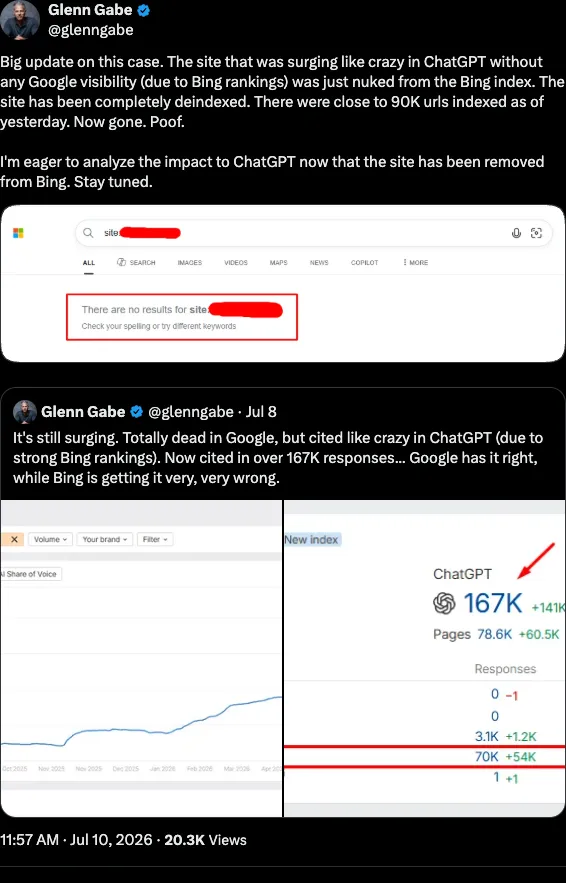
The relationship became more visible in 2026. Glenn Gabe's full case study documented a YMYL site with extensive ChatGPT citations, strong Bing visibility, and almost no Google visibility.
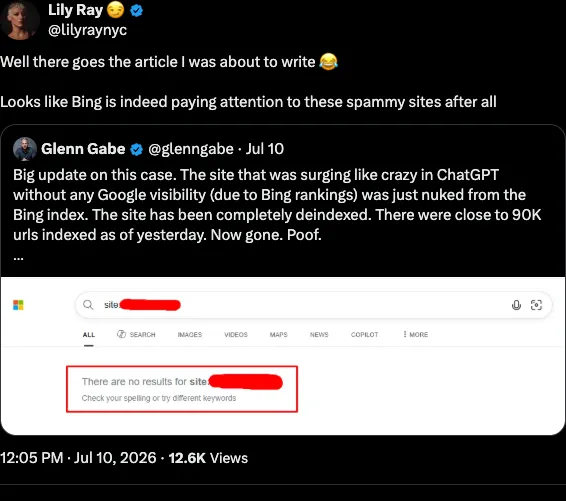
The July follow-up unfolded publicly. The screenshots below separate the deindexing observation, Lily Ray's independent reaction, Microsoft's acknowledgement, and Bing's explanation of its enforcement model. Each screenshot links to its original post.
The Bing deindexing observation
An independent industry observation
Microsoft acknowledges the report

Bing explains its enforcement model

Screenshots captured July 18, 2026. X may change interface labels, engagement counts, or post availability.
Search Engine Roundtable's July 13 report preserves the exchange and chronology in one secondary source.
Two different numbers appeared in the case and should not be combined: the June case discussed approximately 90,000 ChatGPT citations, while the July update discussed approximately 90,000 URLs indexed in Bing.
- February 2025
Seer measures SearchGPT and Bing overlap
In its tested query set, Seer Interactive found 87% of SearchGPT citations matched URLs in Bing's organic results. This is a dated study result, not a permanent system-wide percentage.
Read the Seer Interactive study - June 16, 2026
A Bing-visible site surges in ChatGPT
Glenn Gabe documented a YMYL site with extensive ChatGPT citations and strong Bing visibility despite almost no Google visibility.
Read Glenn Gabe's case study - July 8, 2026
Microsoft Bing acknowledges the report
Krishna Madhavan, Principal Product Manager at Microsoft Bing, said the team would examine the reported site.
View Krishna Madhavan's response - July 10, 2026
About 90,000 URLs disappear from Bing
Gabe reported that the same site had been completely removed from Bing's index. This created a test condition for monitoring downstream ChatGPT citations.
View the deindexing update - July 10, 2026
Bing says enforcement is not one-off
Madhavan clarified that Bing does not perform one-off actions because that approach is not scalable, pointing instead to detection applied across the index.
View Microsoft's clarification
Interpretation: the observations support monitoring Bing as an important discovery and visibility layer. They do not prove that ChatGPT only uses Bing or that a Bing ranking guarantees a citation.
Measure Each Layer Separately
Do not compress public crawlability, Bing indexing, Bing rankings, and ChatGPT citations into one "AI visibility score." Each layer needs different evidence:
| Layer | Evidence source | What it establishes |
|---|---|---|
| Public technical eligibility | HTTP response, canonical, robots directives, public indexability checker | A crawler can access and interpret the URL |
| Bing inclusion | BWT URL Inspection and sitemap reports | Bing knows about or indexes the page |
| Bing search visibility | BWT query/page performance and controlled result sampling | The page appears for relevant Bing searches |
| OpenAI crawler access | Server logs for OAI-SearchBot and ChatGPT-User | An OpenAI user agent requested the page |
| ChatGPT citation selection | A dated, repeatable prompt test | ChatGPT cited the page for that prompt and test context |
| Business impact | Analytics and CRM | The referral or assisted visit produced a useful outcome |
OpenAI documents separate purposes for its crawlers: OAI-SearchBot supports search discovery, while ChatGPT-User may visit a page in response to a user request. A bot request is evidence of access, not proof of indexing, citation, ranking, or endorsement. Check the current OpenAI crawler documentation before changing robots rules.
Run a Repeatable Bing-to-Chatgpt Citation Test
Use the same method each month so changes are comparable:
- Select 25-50 commercially relevant prompts and record the country, account state, and test date.
- Run each prompt with ChatGPT Search and record every cited URL.
- Search the equivalent query in Bing and Google, then record whether the cited URL appears in the top 10, 20, or 50 results.
- Check the cited page in BWT for Bing inclusion, impressions, queries, and position.
- Check server logs for
bingbot,OAI-SearchBot, andChatGPT-Userrequests. - Record ChatGPT referral sessions and qualified conversions separately from citation counts.
- Repeat the exact prompt set monthly. Report correlation and changes; do not label overlap as proof of causation.
Download the Bing-ChatGPT Citation Overlap Worksheet. The CSV includes fields for prompts, cited URLs, Bing and Google positions, Bing index status, OpenAI crawler observations, referrals, conversions, and test context.
Calculate the observed Bing overlap for the tested set as:
Bing citation overlap =
ChatGPT-cited URLs found in Bing results / all ChatGPT-cited URLs tested × 100
The useful operating question is not "Does Bing power every answer?" It is: when a priority page gains or loses Bing inclusion and visibility, do its ChatGPT citations and qualified referrals change under the same test method?
Setup and Weekly Review Workflow
Set up BWT once, then make it a weekly owned check.
If the immediate job is getting a new site or missing page technically eligible, resolve Bing discovery and indexing before building the weekly reporting workflow.
- Create the account: Use a Microsoft, Google, or Facebook login the company can retain.
- Add the exact property: Match the canonical protocol and host, such as
https://www.example.comversushttps://example.com. - Verify ownership: Use XML file upload for root access, a meta tag for template access, or DNS CNAME for domain-level proof. Leave the verification method live.
- Import from Google Search Console when available: Import the property and sitemap, then confirm the imported sitemap matches the live canonical sitemap.
- Submit the sitemap: Record submitted URLs, indexed URLs, crawl errors, and submission date.
- Assign owners: Marketing owns query/page reviews, engineering owns crawl/index defects, and analytics owns GA4 or CRM conversion checks.
Weekly review cadence:
| Review item | Owner | Metric | Action threshold |
|---|---|---|---|
| Search performance | SEO/content | Clicks, impressions, CTR, average position | Rewrite title/meta when a relevant page has high impressions and low CTR |
| Sitemap health | Technical SEO | Submitted vs indexed URLs | Investigate if important URLs remain unindexed after 7-14 days |
| Crawl errors | Engineering | 404s, server errors, DNS failures | Fix revenue pages first; redirect deleted pages only to relevant replacements |
| SEO Reports and Site Scan | SEO/engineering | Issue count by template | Fix recurring template defects before one-off page issues |
| Business impact | Analytics/revenue | Bing-assisted conversions, qualified leads, revenue | Keep changes that improve conversion quality, not just clicks |
Dashboard map: Reports & Data covers queries, pages, clicks, impressions, CTR, countries, and devices; Configuration covers sitemaps, crawl behavior, URL submission, and robots.txt; Diagnostics & Tools covers SEO Analyzer, mobile testing, markup validation, Site Scan, and site moves. Treat traffic drops, crawl failures, or security alerts as same-week work.
Submitting and Managing Sitemaps
A sitemap is a discovery file, not a ranking lever. Use it to tell Bing which canonical, public URLs matter and when they changed. Exclude admin pages, duplicate URLs, redirected URLs, noindexed pages, and thin variants.
Submission process:
- Open Configuration > Sitemaps.
- Click "Submit a Sitemap."
- Enter the canonical XML sitemap or sitemap index URL, usually
https://www.example.com/sitemap.xml. - Record submitted URLs, indexed URLs, errors, and the submission date.
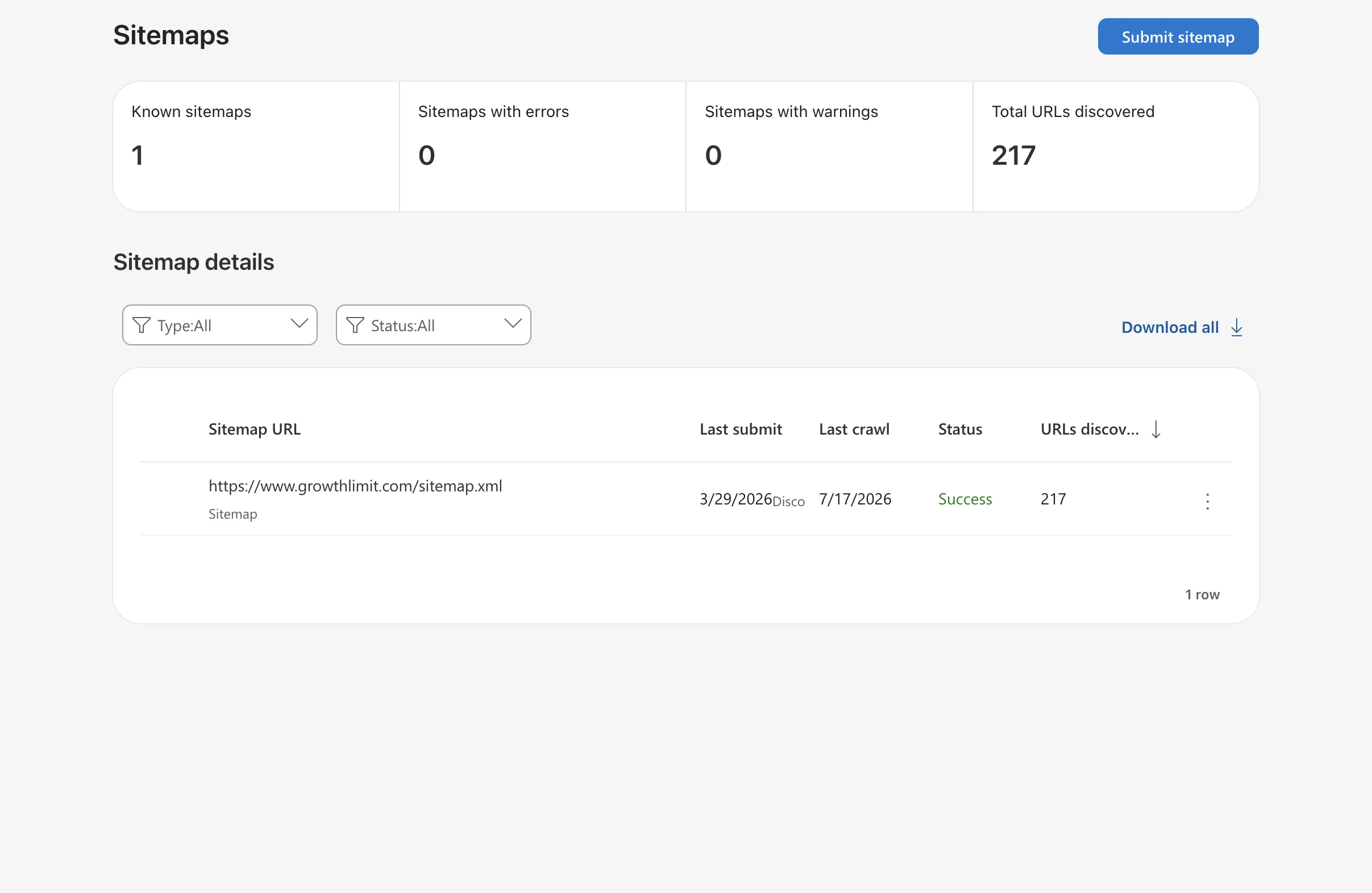
- 1Known sitemaps confirms Bing recognizes the submitted sitemap file.
- 2Total URLs discovered is a discovery count, not a guarantee that every URL is indexed.
- 3Success confirms the sitemap was processed without a reported error.
- 4Check the canonical sitemap URL plus its last submission and crawl dates.
Growth Limit property data. Interface captured July 19, 2026. Microsoft may change labels or report layouts.
Check the Sitemaps dashboard weekly. A large gap between submitted and indexed URLs usually means crawl blocks, redirects, duplicate URLs, weak pages, or stale sitemap generation.
Common errors:
- Invalid XML: Fix encoding, required tags, and broken open/close tags.
- Wrong URLs: Keep only canonical 200-status URLs; remove redirects and errors.
- Oversized files: Keep each sitemap under 50,000 URLs and 50MB uncompressed, then use a sitemap index for larger sites.
Update the sitemap whenever publishing, pruning, migrating, or changing URL structure. Do not resubmit unchanged files just to look busy.
Performance Reports and Analytics
Use performance reports to decide whether a Bing page needs a snippet rewrite, content rewrite, or no action.
| Metric | What it means | Decision rule |
|---|---|---|
| Clicks | Bing search visits to the site | Tie to GA4/CRM conversions before calling it growth |
| Impressions | How often the page appeared | High impressions plus low clicks means test title/meta copy |
| CTR | Clicks divided by impressions, multiplied by 100 | Treat below 2% as a review flag, not a universal failure |
| Average position | Mean ranking position for shown queries | Pages around positions 11-20 are usually better rewrite candidates than invisible pages |
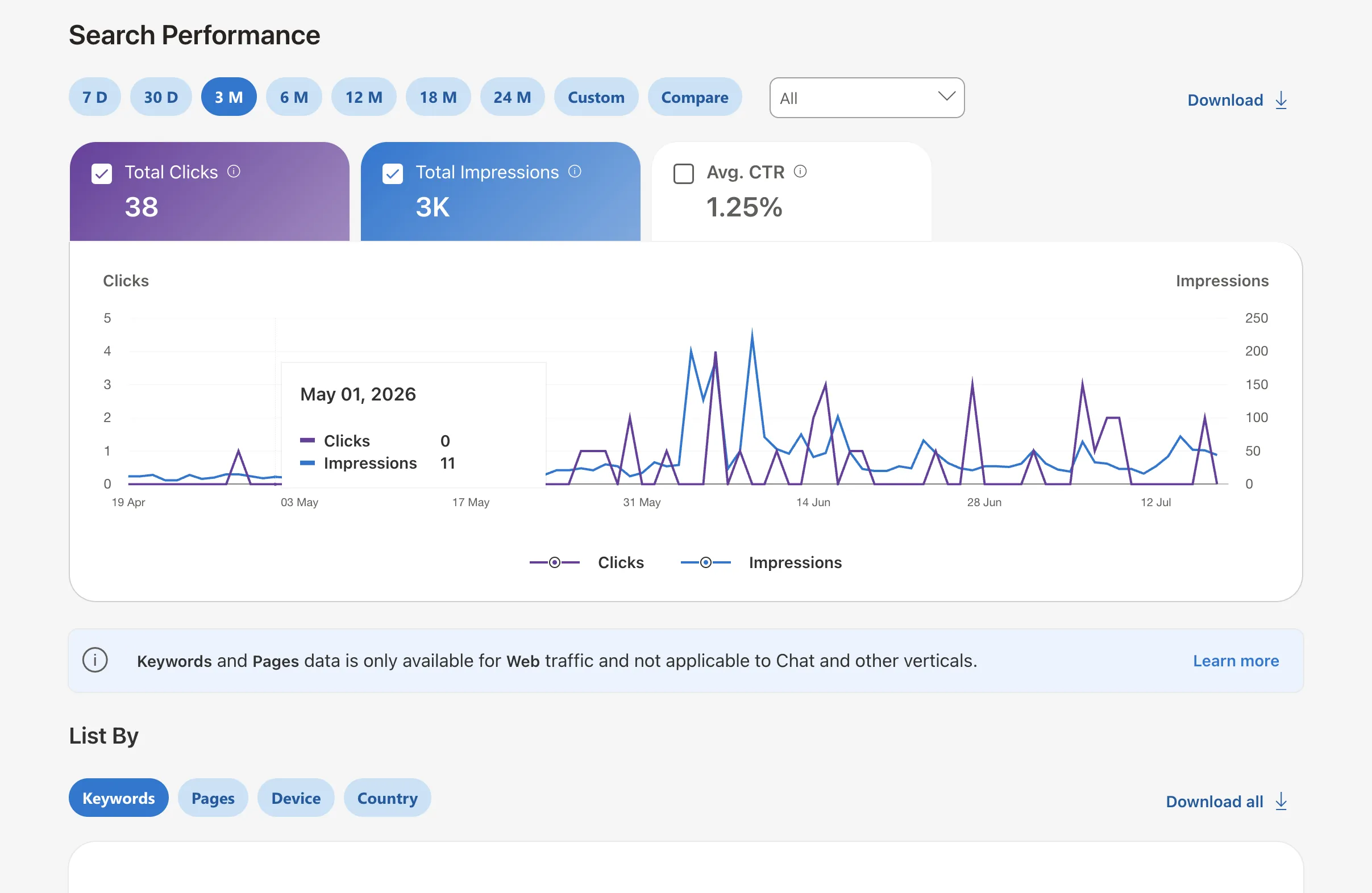
- 1Clicks measure visits from Bing search during the selected date range.
- 2Impressions show how often Growth Limit appeared in eligible Bing results.
- 3The trend chart reveals whether one period caused the aggregate change.
- 4Segment by keyword, page, device, or country before choosing an action.
Growth Limit property data. Interface captured July 19, 2026. Microsoft may change labels or report layouts.
Filter by date range, country, device, page, and query. Then pick one action: rewrite the snippet, expand intent coverage, fix mobile/template issues, or leave the page alone. Do not optimize aggregate charts when one page or query segment is causing the problem.
Index Coverage and Crawl Control
BWT tells you where Bing crawled, what it indexed, and what blocked discovery. Use that evidence before guessing.
Index checks:
- Inspect the URL in BWT after publishing, migration, or a high-value fix.
- Confirm the live URL returns 200, is canonical, and is not blocked by robots.txt or
noindex. - Use
site:example.comonly as a rough manual check; it is not a complete index export. - Request recrawl for time-sensitive or revenue pages after the defect is fixed.
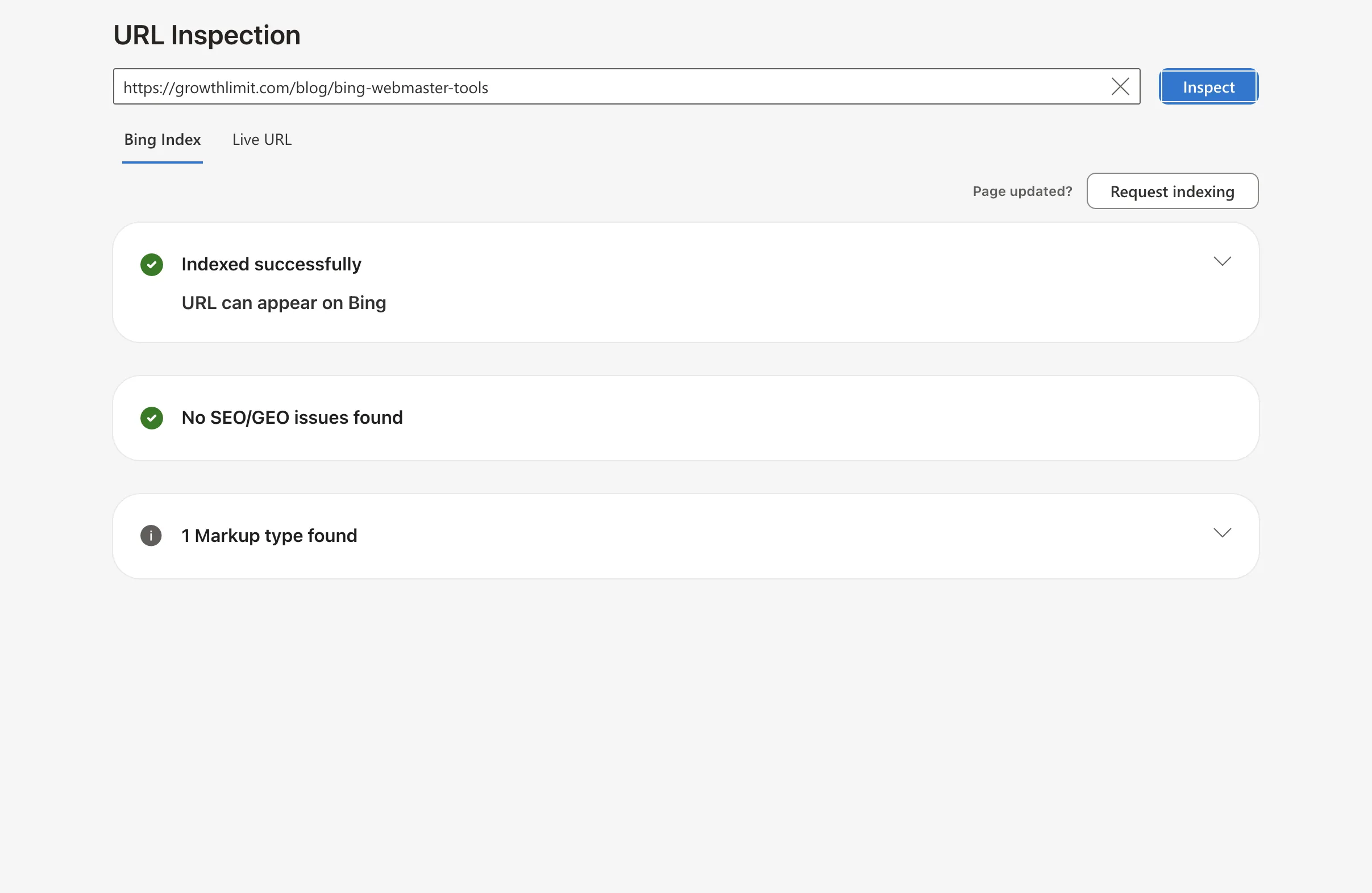
- 1Inspect the exact canonical URL, including its protocol and host.
- 2Bing Index confirms whether the stored URL can appear in Bing.
- 3SEO/GEO checks identify technical or content issues Bing detected.
- 4Request indexing only after publishing or making a meaningful page update.
Growth Limit property data. Interface captured July 19, 2026. Microsoft may change labels or report layouts.
Crawl settings should usually stay at default. Change Crawl Control only when server logs show Bingbot causing load or missing important fresh content. Validate robots.txt in BWT and keep directives simple:
User-agent: bingbot
Disallow: /admin/
Disallow: /private/
Allow: /
Sitemap: https://www.example.com/sitemap.xml
If pages are missing from Bing, check crawl errors, robots.txt blocks, meta robots tags, canonicals, redirects, server response codes, thin duplicates, and sitemap freshness in that order.
Free public diagnostic
Check whether a URL is technically accessible to Bing
Test the response, redirects, canonical, robots directives, Bingbot access, sitemap discovery, and page title. No account or site access required.
Research and Search Terms
Use BWT's research data to learn the language Bing searchers use before they click.
| Data | How to use it | Ignore when |
|---|---|---|
| Search terms | Rewrite titles, headings, and sections around real query language | The term has no buying, support, or evaluation intent |
| Volume and competition | Size the opportunity before assigning writers | The page cannot satisfy the intent |
| Positions 11-20 | Prioritize rewrites with a realistic visibility path | The result is irrelevant or the page converts poorly |
| Suggested bid data | Infer commercial pressure, not organic ROI | Paid data conflicts with CRM quality |
For each chosen term, update the title, meta description, internal links, and page section that answers the query. Stop when the page matches intent; do not stuff related terms or build topic clusters without a conversion reason.
Backlinks and Link Analysis
Use Reports & Data > Inbound Links to review linking domains, linking pages, anchor text, and target pages. BWT's link data is a Bing-specific sample, so compare it with Ahrefs or Semrush before making risk decisions.
Review links by pattern:
- Useful: relevant publications, partners, customers, associations, and educational references.
- Neutral: scraper copies, weak directories, and generic mentions search engines may ignore.
- Risky: paid networks, hacked pages, exact-match anchors at scale, or links you created and cannot defend.
Use Disavow Links only for patterns you can justify. Document removal attempts first, submit specific URLs when possible, and disavow a whole domain only when the entire domain is the problem.
For a broader evidence review than BWT's sample, the open-source Toxic Backlink Checker can reconcile DataForSEO with Search Console or vendor CSV exports, preserve source attribution, compare audits over time, group referring-domain patterns, inspect representative pages, and export a draft only after human approval.
SEO Reports and Recommendations
Use SEO Analyzer for page-level checks and SEO Reports for template-level patterns. They are triage tools; they do not prove that a change will increase revenue.
| Report finding | First action | Business check |
|---|---|---|
| Missing or duplicate title/meta | Rewrite pages with impressions first | CTR, qualified leads, and assisted conversions |
| Header hierarchy issues | Fix the template before editing one-off pages | Fewer repeated report issues |
| Images missing alt text | Add useful alt text on visible, meaningful images | Accessibility and image/search traffic where relevant |
| Thin or duplicate content | Consolidate, expand, canonicalize, or remove | More indexed priority pages, not more pages |
| Internal linking gaps | Add links from relevant pages with real user paths | Better discovery and conversion paths |
After each fix, rerun the analyzer, annotate the edit date, and compare Bing clicks with GA4/CRM outcomes. Keep fixes that change a metric; stop polishing report scores that do not affect a page people use.
Failure Modes and Caveats
| Failure mode | What it usually means | Fix |
|---|---|---|
| Verification fails | The XML file, meta tag, or DNS record is missing, cached, or attached to the wrong host | Check the exact canonical host, clear cache, keep the verification asset live, and use DNS if theme access is unreliable |
| BWT and GA4 disagree | They measure different systems: Bing search events versus all-site sessions and conversions | Compare trends by date range, not raw totals; use GA4/CRM for revenue and BWT for Bing search evidence |
| Important URLs are not indexed | Robots.txt, noindex, redirects, server errors, thin duplicates, or crawl delays may block discovery | Inspect the URL, confirm a 200 response, remove accidental blocks, update the sitemap, and request recrawl |
| Crawl errors spike | Deleted pages, unstable hosting, DNS failures, or bad redirects are wasting crawl budget | Fix revenue pages first, then redirect only to relevant replacements |
| Data appears late | BWT reporting can lag; real-time decisions need server logs, analytics, or paid search data | Wait 24-48 hours for normal delays, then check Microsoft status/help if reporting remains stale |
| Link data looks alarming | A raw backlink list is not proof of a penalty | Review patterns, attempt removal for clearly harmful links, and reserve disavow for links you can justify |
FAQ: Questions and Topics
Q: Does BWT integrate with Google Analytics?
A: Not directly. Compare matching date ranges, then use GA4 or the CRM to connect Bing clicks to conversions, qualified leads, pipeline, and revenue.
Q: When should I use URL Inspection?
A: After publishing, migrating, or fixing a high-value page. It confirms crawl/index status and can request recrawl; ranking and conversion lift still depend on relevance, demand, and the landing page.
Q: What alternatives belong beside BWT?
A: Google Search Console for Google coverage, Screaming Frog for crawl depth, GA4 for behavior, Ahrefs or Semrush for broader link and keyword indexes, and the CRM for revenue attribution.
Conclusion
BWT is worth using when it has an owner and a business metric. Loop: verify, submit, inspect, fix, measure, and keep only changes that improve indexed priority pages, Bing clicks, qualified leads, or revenue. If a report cannot change an action or metric, archive it.
Use one call to test fit.
Growth Limit checks whether the page topic connects to a real organic-acquisition constraint before proposing work.